GSTR-3B: Format, Due Dates, Filing Steps & Latest Updates
- What it is: Monthly summary GST return for outward supplies, ITC, and net tax payment
- Who files: All regular GST-registered taxpayers, not composition dealers, ISD, or non-residents
- Monthly due date: 20th of the following month
- QRMP due date: 22nd (Group A states) or 24th (Group B states) of the month following quarter end
- Tax payment: Mandatory before or while filing - GSTR-3B is a self-assessed payment statement
- Can it be revised: No - errors must be corrected in the next period's GSTR-3B or through the proper adjustment route
- Table 3 outward liability: Auto-populated from GSTR-1, GSTR-1A, and IFF from the relevant updated periods and no longer freely editable
- Table 3.2: Non-editable from November 2025
- Filing time bar: A portal-enforced 3-year filing limit applies to delayed GSTR-3B filings
- Late fee: Subject to applicable daily rates and maximum caps
- Interest on delayed payment: 18% per annum from the due date on unpaid tax
What Is GSTR-3B?
GSTR-3B is a monthly summary return under GST where taxpayers declare details of outward supplies, inward supplies liable to reverse charge, input tax credit available and claimed, and the net GST liability payable for a tax period. Unlike GSTR-1, which captures outward supplies in greater detail, GSTR-3B presents consolidated summary figures.
GSTR-3B is the return through which GST liability is actually discharged. Tax payment must be completed before or while filing GSTR-3B. It is treated as a self-assessed statement of tax liability and, once filed, it cannot be revised. Any errors discovered after filing must be corrected through adjustments in the next period's GSTR-3B or through the proper correction route permitted under GST law.
GSTR-3B is filed monthly by most taxpayers and quarterly by eligible taxpayers under the QRMP scheme, with monthly tax payments made via challan. Every regular GST-registered business generally files both GSTR-1 and GSTR-3B for each tax period.
Everything You Need for GSTR-3B in One Dashboard
Join our guided walkthrough to see how BUSY can transform your business operations.
GSTR-3B: Your Monthly GST Summary

Key GSTR-3B Changes in 2025-2026
Critical Update: Major System Changes Effective in 2025-2026
The GST portal has implemented significant changes to GSTR-3B mechanics. If you are filing under old assumptions, you may face system errors, mismatch issues, or compliance gaps.
| Change | Effective From | What Changed |
|---|---|---|
| Table 3 liability auto-population and hard lock | July 2025 period onwards | Relevant outward liability fields are auto-populated from GSTR-1, GSTR-1A, and IFF and are no longer manually editable |
| Table 3.2 non-editable | November 2025 | Inter-state supplies to unregistered persons, composition taxpayers, and UIN holders are auto-filled from GSTR-1 / IFF and cannot be manually changed |
| ITC reclaim validation tightening | Late 2025 / early 2026 system rollout | Portal validations restrict filing if reclaimed ITC in Table 4(D)(1) exceeds the available reclaim balance shown by the system |
| Tax Liability Breakup auto-population | January 2026 tax period onwards | Tax Liability Breakup, as applicable, is auto-populated by the GST portal |
| 3-year filing time bar | Portal-enforced | GSTR-3B cannot be filed once the portal-level 3-year time limit from the due date is crossed |
Change
Effective From
What Changed
Change
Effective From
What Changed
Change
Effective From
What Changed
Change
Effective From
What Changed
Change
Effective From
What Changed
What These Changes Mean for Your Filing Workflow
Before July 2025, taxpayers could manually enter outward supply figures in GSTR-3B Table 3, which made mismatch with GSTR-1 possible.
From the updated system rollout, outward liability figures in the relevant Table 3 fields are driven from GSTR-1, GSTR-1A, and IFF. That means the filing order matters even more now.
What you must do now:
- File GSTR-1 first
- Review outward liability figures auto-populated in GSTR-3B
- If GSTR-1 data is wrong, correct it through GSTR-1A within the same period where available, before filing GSTR-3B
- Complete ITC, reversals, and payment sections carefully
- Check reclaim ledger balance before reporting reclaimed ITC in Table 4(D)(1)
Who Needs to File GSTR-3B?
All regular GST-registered taxpayers must file GSTR-3B, including:
- Companies, firms, LLPs, and individuals registered under GST with taxable outward supplies
- Exporters of goods or services
- Businesses under the QRMP scheme , which file quarterly but pay monthly through challan
- Businesses with nil activity for the period, which must still file nil GSTR-3B
Who does not file GSTR-3B?
- Composition scheme taxpayers, who file GSTR-4 instead
- Non-resident taxable persons, who file GSTR-5
- Input Service Distributors, who file GSTR-6
- TDS deductors, who file GSTR-7
TCS collectors such as certain e-commerce operators, who file GSTR-8
GSTR-3B Due Dates: Monthly and QRMP
Monthly Filers
| Tax Period | GSTR-3B Due Date |
|---|---|
| April 2025 | 20th May 2025 |
| May 2025 | 20th June 2025 |
| June 2025 | 20th July 2025 |
| July 2025 | 20th August 2025 |
| August 2025 | 20th September 2025 |
| September 2025 | 20th October 2025 |
| October 2025 | 20th November 2025 |
| November 2025 | 20th December 2025 |
| December 2025 | 20th January 2026 |
| January 2026 | 20th February 2026 |
| February 2026 | 20th March 2026 |
| March 2026 | 20th April 2026 |
Tax Period
GSTR-3B Due Date
Tax Period
GSTR-3B Due Date
Tax Period
GSTR-3B Due Date
Tax Period
GSTR-3B Due Date
Tax Period
GSTR-3B Due Date
Tax Period
GSTR-3B Due Date
Tax Period
GSTR-3B Due Date
Tax Period
GSTR-3B Due Date
Tax Period
GSTR-3B Due Date
Tax Period
GSTR-3B Due Date
Tax Period
GSTR-3B Due Date
Tax Period
GSTR-3B Due Date
QRMP Filers
| Quarter | GSTR-3B Due Date |
|---|---|
| Q1 (Apr-Jun 2025) | 22nd or 24th July 2025, state-dependent |
| Q2 (Jul-Sep 2025) | 22nd or 24th October 2025 |
| Q3 (Oct-Dec 2025) | 22nd or 24th January 2026 |
| Q4 (Jan-Mar 2026) | 22nd or 24th April 2026 |
Quarter
GSTR-3B Due Date
Quarter
GSTR-3B Due Date
Quarter
GSTR-3B Due Date
Quarter
GSTR-3B Due Date
Monthly tax payment for QRMP: Even though GSTR-3B is quarterly, QRMP filers must deposit tax monthly through challan by the 25th of the following month for months 1 and 2 of each quarter.
State-wise QRMP Due Date Groups (22nd vs 24th)
Under QRMP, quarterly GSTR-3B due dates differ by state and Union Territory:
| Group | Due Date | States / UTs |
|---|---|---|
| Group A | 22nd of month after quarter end | Chhattisgarh, Madhya Pradesh, Gujarat, Maharashtra, Karnataka, Goa, Kerala, Tamil Nadu, Telangana, Andhra Pradesh, Daman and Diu, Dadra and Nagar Haveli, Puducherry, Andaman and Nicobar Islands, Lakshadweep |
| Group B | 24th of month after quarter end | Himachal Pradesh, Punjab, Uttarakhand, Haryana, Rajasthan, Uttar Pradesh, Bihar, Sikkim, Arunachal Pradesh, Nagaland, Manipur, Mizoram, Tripura, Meghalaya, Assam, West Bengal, Jharkhand, Odisha, Jammu and Kashmir, Ladakh, Chandigarh, Delhi |
Group
Due Date
States / UTs
Group
Due Date
States / UTs
GSTR-3B Format: Table-by-Table Breakdown
Understanding what goes into each table is essential for accurate filing, especially after the recent auto-population changes.
Table 3: Outward Supplies and Reverse Charge
Table 3.1 - Details of Outward Supplies
| Row | What to Report |
|---|---|
| 3.1(a) | Outward taxable supplies, other than zero-rated, nil-rated, and exempt |
| 3.1(b) | Outward taxable supplies that are zero-rated, including exports and SEZ supplies with or without payment of tax |
| 3.1(c) | Other outward supplies that are nil-rated or exempt |
| 3.1(d) | Inward supplies attracting reverse charge liability |
| 3.1(e) | Non-GST outward supplies |
Row
What to Report
Row
What to Report
Row
What to Report
Row
What to Report
Row
What to Report
From the updated system rollout, relevant liability values in Table 3.1 are auto-filled from your filed GSTR-1, GSTR-1A, or IFF. These fields are read-only. Review them for accuracy before submitting GSTR-3B.
Table 3.2 - Inter-state Supplies to Specific Recipients
This table reports inter-state supplies made to:
Unregistered persons
UIN holders
From November 2025, these values are auto-populated from GSTR-1 / IFF and cannot be changed manually.
Table 4: Input Tax Credit (ITC)
Table 4 is the most complex section and remains critical for filing accuracy. It captures ITC available, reversed, net claimed, and reclaimed.
| Sub-table | Description |
|---|---|
| 4(A) | ITC available, based on system data and taxpayer review, including imports, reverse charge, ISD, and other eligible ITC |
| 4(B)(1) | ITC reversed - non-reclaimable, such as Rule 38, Rule 42, Rule 43, and Section 17(5) |
| 4(B)(2) | ITC reversed - reclaimable, such as Rule 37 reversals or other temporary reversals |
| 4(C) | Net ITC available = 4(A) minus 4(B) |
| 4(D)(1) | ITC reclaimed - amounts earlier reversed under reclaimable category and now being reclaimed |
| 4(D)(2) | Ineligible ITC, including time-barred or place of supply related ineligible amounts as reflected by system logic |
Sub-table
Description
Sub-table
Description
Sub-table
Description
Sub-table
Description
Sub-table
Description
Sub-table
Description
Table 5 (Exempt/Non-GST Inward Supplies)
Captures summary of purchases from composition dealers and other non-taxable inward supplies.
Table 5.1 (Interest & Late Fee):
Effective January 2026, interest is auto-calculated based on your net cash shortfall.
The portal-computed interest is non-editable downward; you can only increase the amount if your own calculations are higher.
Table 6: Tax Payable and Paid
| Sub-table | Description |
|---|---|
| 6.1 | Tax payable and paid under IGST, CGST, SGST / UTGST, and Cess, split between ITC and cash |
| 6.2 | TDS and TCS credits being used against tax payable |
Sub-table
Description
Sub-table
Description
Table 6.1 is the payment reconciliation table. It shows exactly how much liability you are settling through the electronic credit ledger and how much through the electronic cash ledger.
How GSTR-1, GSTR-2B, and GSTR-3B Work Together
These three returns form an interconnected system:
GSTR-1 (your outward supply reporting) -> GSTR-2B (recipient's ITC visibility) -> GSTR-3B (your tax payment and your own ITC claim)
The workflow is:
- You file GSTR-1 with invoice-level details of outward supplies
- Those invoices flow into the recipient's GSTR-2B
- The recipient uses GSTR-2B as the practical basis for ITC reconciliation before filing GSTR-3B
- At the same time, your own GSTR-1 data auto-populates outward liability fields in your GSTR-3B
- You then complete Table 4, calculate net liability in Table 6, pay tax, and file
The critical link is simple: your GSTR-1 filing affects both your own GSTR-3B liability flow and your buyer's ITC visibility.
How to File GSTR-3B on the GST Portal (Step-by-Step)
1. Log in to the GST Portal with your credentials.

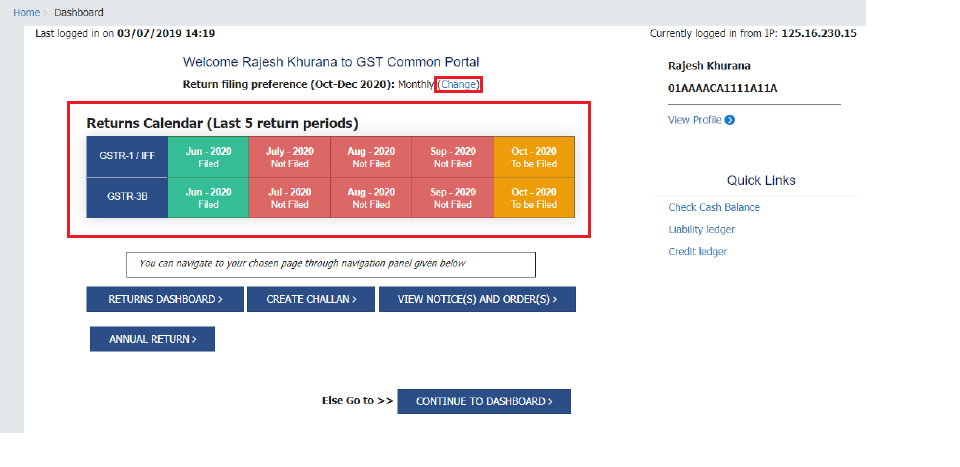
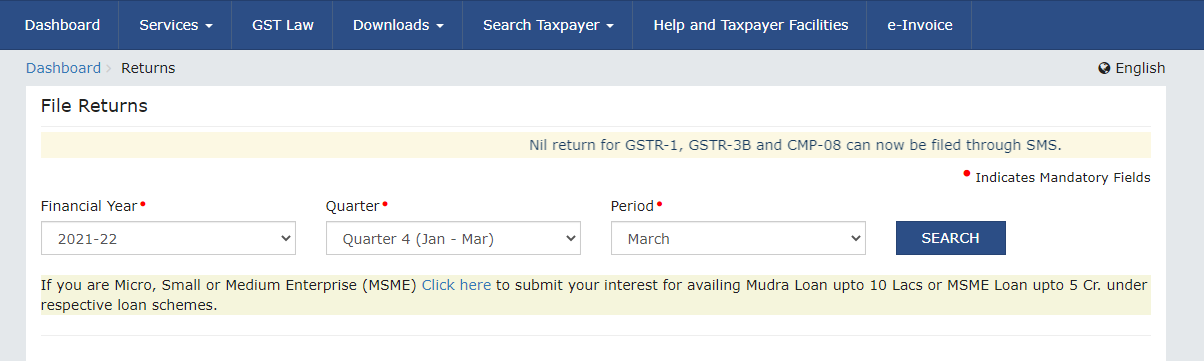
2. Go to Services > Returns > Returns Dashboard and select the relevant Financial Year and Tax Period.
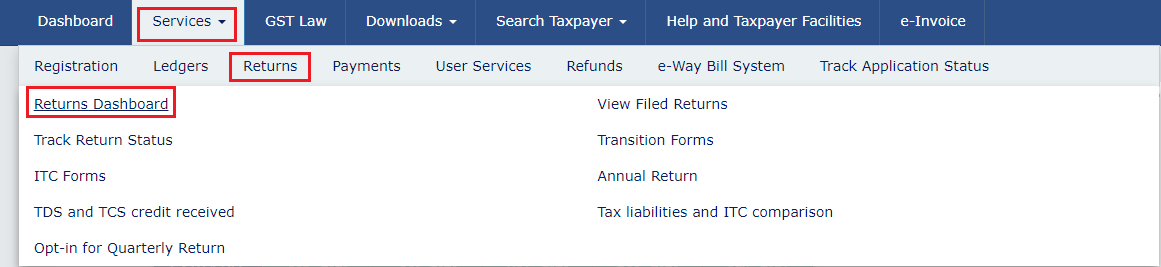
Go to Services
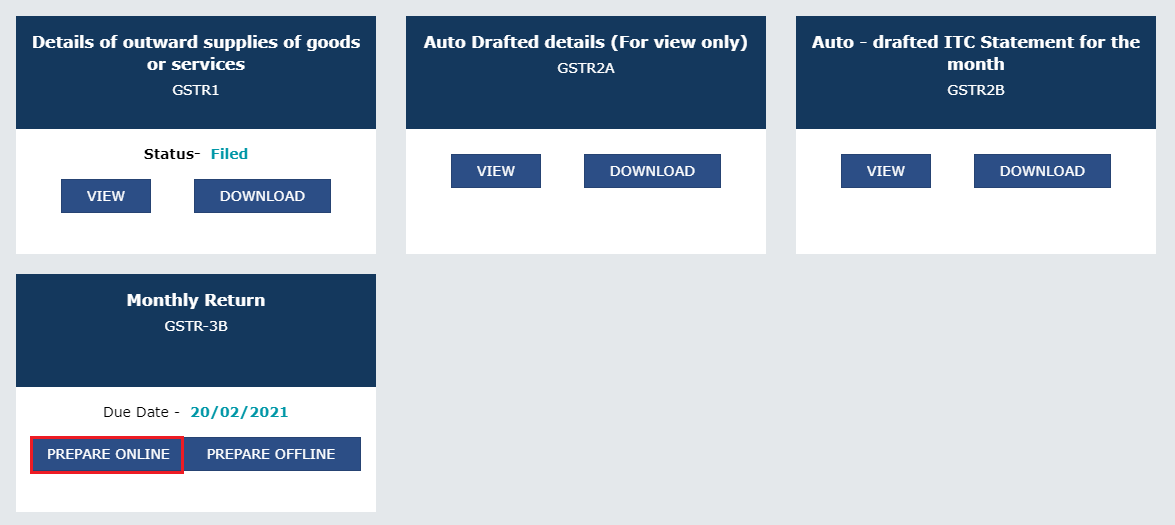
3. Click Prepare Online under the GSTR-3B tile.
4. Review Auto-Populated Data (Table 3):
- Mandatory Sequence: You must file GSTR-1 for the same period before GSTR-3B can be filed.
- Outward liability in Table 3.1 and Table 3.2 is auto-populated from GSTR-1, GSTR-1A, or IFF.
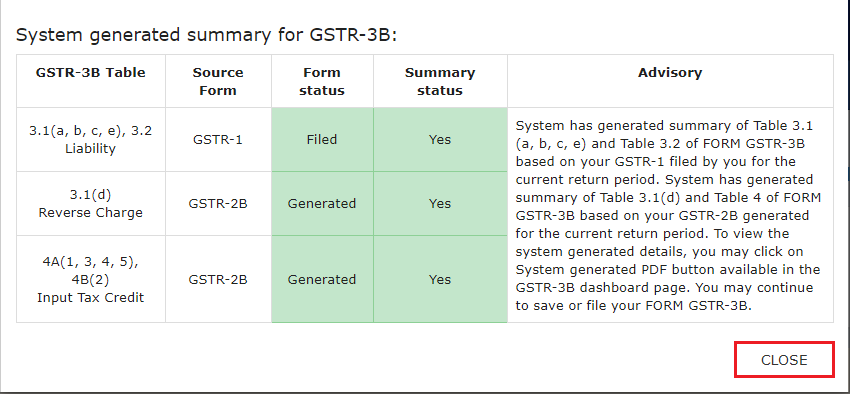
c. Non-Editable Rule: Since July 2025, these fields are hard-locked. If values are incorrect, you must file Form GSTR-1A to amend them before proceeding with GSTR-3B.
5. Complete ITC & Other Details (Tables 4 & 5):
d. Table 4 (Eligible ITC): Auto-populated from GSTR-2B. Verify and apply reversals as needed.
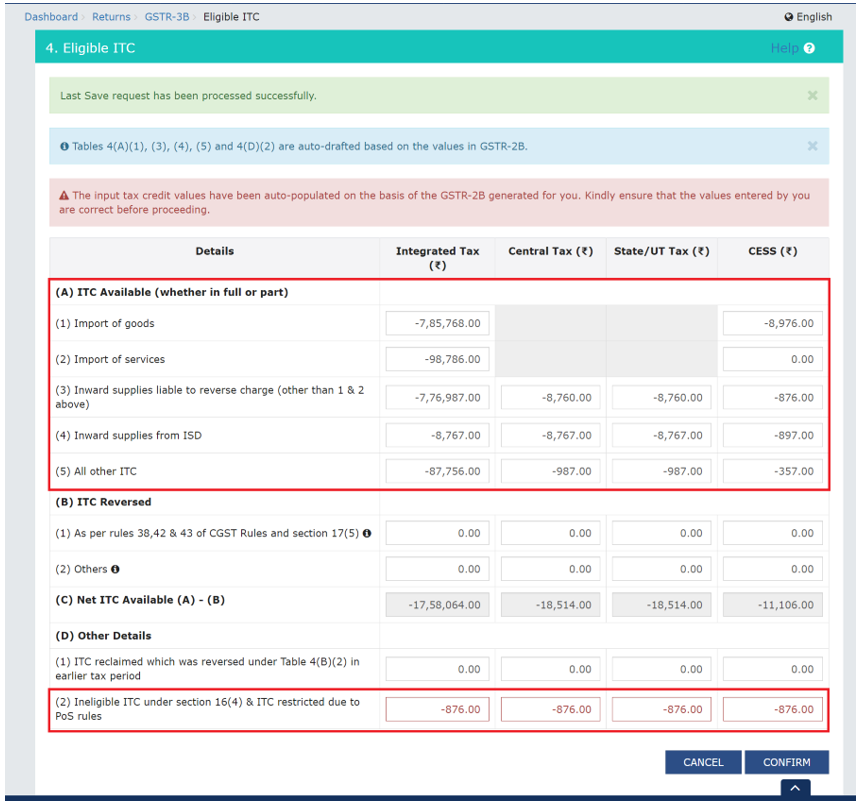
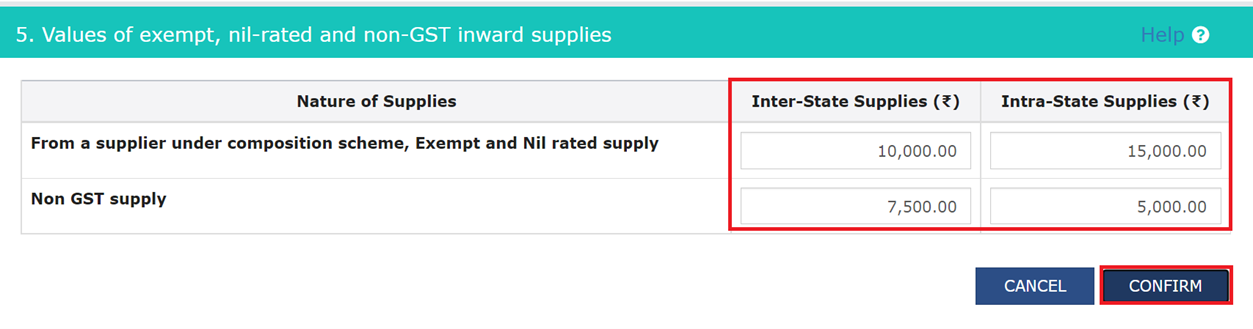
e. Table 5: Manually enter exempt, nil-rated, and non-GST inward supplies.
Track Tax Claim ITC and Generate Returns With BUSY
* No credit card required
6. Save & Compute Liability:
f. Click Save GSTR-3B.
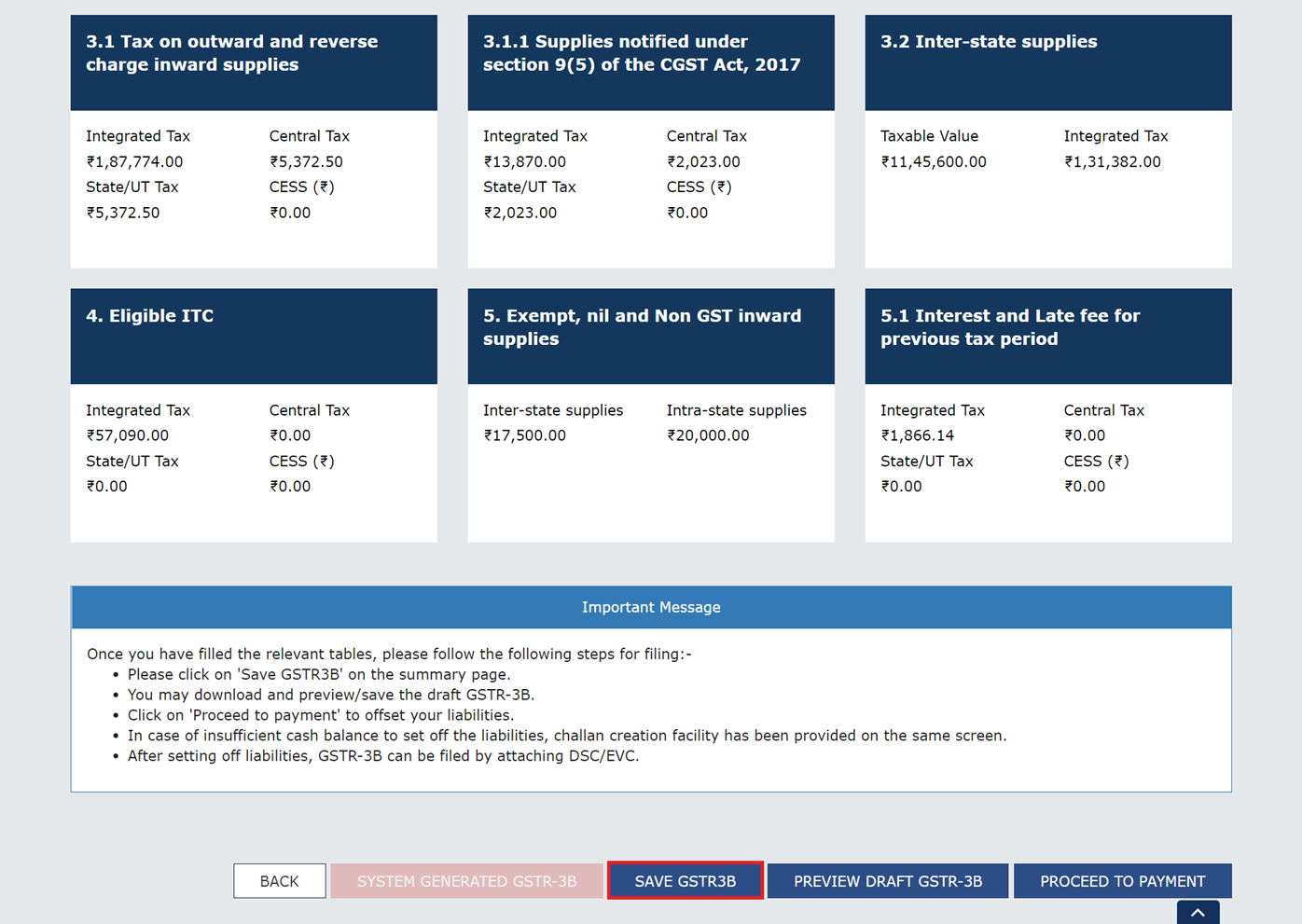
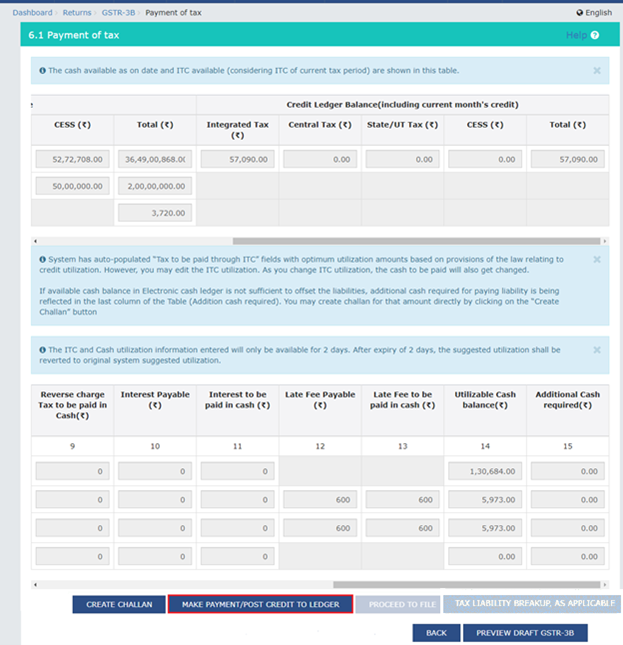
g. Click Proceed to Payment. The system computes the net tax payable after automatically offsetting available ITC.
7. NEW MANDATORY STEP: Tax Liability Breakup:
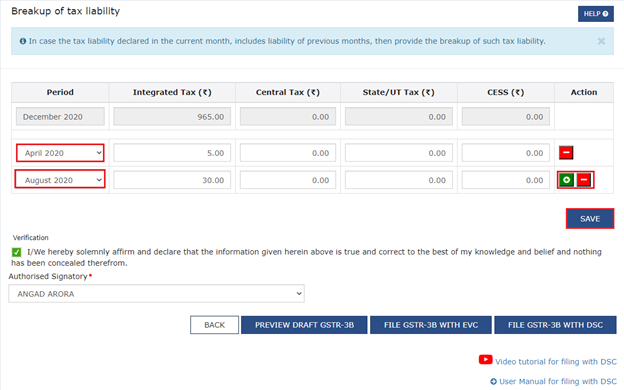
h. As of February 2026, if you are discharging any liability for a previous period in the current return, you must click the Tax Liability Breakup, As Applicable button.
i. Provide the period-wise breakup and click Save within this tab. Failure to do this may keep the "Proceed to File" button disabled.
8. Payment & Offset:
j. If the cash ledger balance is insufficient, click Create Challan to pay via net banking, UPI, or NEFT/RTGS.
k. Click Make Payment/Post Credit to Ledger to finalize the offset. Once clicked, data is locked and cannot be edited.
9. Preview & Filing:
i. Click Preview Draft GSTR-3B to review the final PDF.
m. Select the declaration checkbox and authorized signatory.
n. Click File GSTR-3B with EVC (OTP-based) or DSC (Digital Signature).
o. Download the ARN acknowledgement for your records.
Late Fee, Interest, and Penalty for GSTR-3B
Daily Late Fee Rates
| Return Type | Daily Late Fee |
|---|---|
| Returns with tax liability | Rs 50 per day (Rs 25 CGST + Rs 25 SGST) |
| Nil returns | Rs 20 per day (Rs 10 CGST + Rs 10 SGST) |
Return Type
Daily Late Fee
Return Type
Daily Late Fee
Turnover-Based Maximum Late Fee Caps
| Annual Turnover | Maximum Late Fee per Return Period |
|---|---|
| Nil return filers | Rs 500 (Rs 250 CGST + Rs 250 SGST) |
| Up to Rs 1.5 crore | Rs 2,000 (Rs 1,000 CGST + Rs 1,000 SGST) |
| Rs 1.5 crore to Rs 5 crore | Rs 5,000 (Rs 2,500 CGST + Rs 2,500 SGST) |
| Above Rs 5 crore | Rs 10,000 (Rs 5,000 CGST + Rs 5,000 SGST) |
Annual Turnover
Maximum Late Fee per Return Period
Annual Turnover
Maximum Late Fee per Return Period
Annual Turnover
Maximum Late Fee per Return Period
Annual Turnover
Maximum Late Fee per Return Period
Interest on Delayed Tax Payment
- Rate: 18% per annum on unpaid tax
- Calculation: Daily interest from the GSTR-3B due date to the actual payment date
- Formula: Outstanding tax x 18% x (Days delayed ÷ 365)
Example:
Rs 1,00,000 tax delayed by 30 days
= Rs 1,00,000 x 18% x 30 / 365
= about Rs 1,479 interest
Late fee and interest are separate. Both can apply when filing is delayed and tax remains unpaid.
GSTR-3B Nil Return: When and How to File
If your business had no outward supplies, no ITC to claim , and no tax to pay in a period, you must still file a Nil GSTR-3B .
Filing nil is not optional. Non-filing still attracts late fee, though at the lower nil-return rate.
Who Must File Nil GSTR-3B
- Businesses with zero sales in the period
- Seasonal businesses with no activity in off-season months
- Newly registered businesses that have not started trading
- Registered businesses with no reportable activity for the period
How to File Nil GSTR-3B
- Log in to the GST portal
- Open Returns Dashboard and select GSTR-3B
- Ensure all fields show zero
- Click Confirm Nil Return
- Verify and submit
- File with EVC
Late fee for nil returns applies at the lower daily rate and is subject to the applicable cap.
ITC in GSTR-3B: Table 4 Explained
Table 4 is where ITC is claimed in GSTR-3B. System validations have tightened, especially for reclaimed ITC.
The Golden Rule of ITC in GSTR-3B
As a practical and legally safer compliance rule, claim ITC only after:
- It is visible through GSTR-2B based reconciliation
- The other Section 16 conditions are satisfied
- It is not blocked, reversed, or otherwise ineligible
ITC Auto-Population and Review
System data flows into Table 4, but the taxpayer still has to:
- Review whether the credit is actually eligible
- Exclude blocked or ineligible credit
- Report reversals correctly
- Ensure reclaim entries are within the available reclaim balance
The system calculates Net ITC in Table 4(C) after considering reversals.
Rule 42 and 43: ITC Reversal in GSTR-3B
If your business uses inputs, input services, or capital goods partly for taxable supplies and partly for exempt or non-business purposes, you cannot claim full ITC.
You must reverse proportionate credit under:
- Rule 42 for inputs and input services
- Rule 43 for capital goods
How to Report in GSTR-3B
Rule 42 / 43 reversals are reported in Table 4(B)(1), the non-reclaimable ITC reversal row.
Example:
A real estate developer uses common inputs for both taxable and exempt portions. If total GST on common input is Rs 1,80,000 and 40% relates to exempt use, reversal = Rs 72,000. That amount is reported in Table 4(B)(1).
A commonly missed point is that even businesses selling only taxable goods may still need reversal if common inputs relate partly to exempt income streams such as exempt interest income.
Rule 86A: ITC Blocking Risk
Rule 86A empowers the department to block use of ITC in the electronic credit ledger where there is reason to believe the credit is fraudulently availed or otherwise ineligible.
What Blocking Means
When ITC is blocked:
- You cannot use that blocked ITC to pay output tax
- You may have to pay from cash instead
- The block can continue up to the permitted duration under the rule
How to Reduce Rule 86A Risk
- File GSTR-3B on time
- Reconcile GSTR-2B before claiming ITC
- Avoid claiming ITC from suspicious or non-compliant suppliers
- Respond promptly to departmental communications
- Maintain proper purchase records and invoice trail
Negative ITC: What to Do When ITC Exceeds Liability
If your ITC is higher than your output tax liability in a period, you will have excess ITC.
What Happens to Excess ITC
- It is not lost
- It carries forward automatically in the electronic credit ledger
- It can be used against future output liability
- In eligible cases such as exports, refund provisions may apply
How to Handle in Table 6
If ITC exceeds liability:
- Use ITC only up to the amount of liability
- Net cash liability becomes zero if sufficient ITC exists
- Remaining ITC carries forward automatically
- Do not enter negative values in the tax payment table
Also make sure reclaimed ITC entries do not exceed the system-allowed reclaim balance.
Real-World Example: Priya's Textile Business
Scenario: Priya's Textiles is a B2B fabric manufacturer in Maharashtra, a monthly GSTR-3B filer with Rs 8 crore annual turnover.
April 2026 transactions
| Transaction | Value (Rs) | GST @12% (Rs) |
|---|---|---|
| Sale to ABC Garments (B2B, intra-state) | 5,00,000 | 60,000 (CGST 30,000 + SGST 30,000) |
| Sale to Delhi Exporters (inter-state) | 3,00,000 | 36,000 IGST |
| Purchase of raw fabric (intra-state) | 2,00,000 | 24,000 ITC (CGST 12,000 + SGST 12,000) |
| Purchase of machinery (capital goods, intra-state) | 1,00,000 | 18,000 ITC (CGST 9,000 + SGST 9,000) |
Transaction
Value (Rs)
GST @12% (Rs)
Transaction
Value (Rs)
GST @12% (Rs)
Transaction
Value (Rs)
GST @12% (Rs)
Transaction
Value (Rs)
GST @12% (Rs)
Step 1: GSTR-1 filed by May 11
Both sales invoices are reported correctly in GSTR-1.
Step 2: GSTR-3B Table 3 auto-populated
Table 3.1(a) and related outward liability fields reflect outward taxable value of Rs 8,00,000 and corresponding tax of:
- CGST Rs 30,000
- SGST Rs 30,000
- IGST Rs 36,000
Priya reviews and confirms the figures.
Step 3: GSTR-2B reconciled and Table 4 completed
ITC available after reconciliation:
- CGST Rs 21,000
- SGST Rs 21,000
No reversals are required because all inputs are used for taxable supplies.
Step 4: Table 6 - Net Liability and Payment
| Particulars | CGST (Rs) | SGST (Rs) | IGST (Rs) |
|---|---|---|---|
| Tax Payable | 30,000 | 30,000 | 36,000 |
| Less ITC | 21,000 | 21,000 | - |
| Net Cash to Pay | 9,000 | 9,000 | 36,000 |
Particulars
CGST (Rs)
SGST (Rs)
IGST (Rs)
Particulars
CGST (Rs)
SGST (Rs)
IGST (Rs)
Particulars
CGST (Rs)
SGST (Rs)
IGST (Rs)
Priya pays Rs 54,000 via challan and files GSTR-3B by May 20.
Downstream result: ABC Garments and Delhi Exporters can reconcile Priya's invoices in their relevant GSTR-2B and take eligible ITC subject to their own compliance checks and the applicable statutory conditions.
Common Mistakes in GSTR-3B
| # | Mistake | Impact | Prevention |
|---|---|---|---|
| 1 | Filing GSTR-3B before GSTR-1 workflow is completed | Auto-populated outward liability may not reflect the intended source data | Always complete outward reporting first |
| 2 | Claiming ITC without proper GSTR-2B reconciliation | Reversal and scrutiny risk | Reconcile GSTR-2B before Table 4 entry |
| 3 | Wrong IGST vs CGST + SGST split | Mismatch and notice risk | Verify place of supply for each transaction |
| 4 | Not reversing ITC under Rule 42 / 43 | Under-reported reversal | Calculate proportionate reversal for mixed-use inputs |
| 5 | Missing blocked credit impact | Overstated available ITC | Check electronic credit ledger before filing |
| 6 | Assuming nil return need not be filed | Late fee for non-filing | File nil GSTR-3B where required |
| 7 | Missing monthly challan payment under QRMP | Interest burden | Set monthly payment reminders |
| 8 | Not adjusting for supplier credit notes | Excess ITC risk | Include credit note impact in ITC review |
| 9 | Ignoring Table 3.2 auto-population | Filing confusion | Review non-editable data before submission |
| 10 | Filing after the portal time bar is crossed | Return becomes non-fileable | Clear old periods well in time |
#
Mistake
Impact
Prevention
#
Mistake
Impact
Prevention
#
Mistake
Impact
Prevention
#
Mistake
Impact
Prevention
#
Mistake
Impact
Prevention
#
Mistake
Impact
Prevention
#
Mistake
Impact
Prevention
#
Mistake
Impact
Prevention
#
Mistake
Impact
Prevention
#
Mistake
Impact
Prevention
How to Correct GSTR-3B Errors
GSTR-3B cannot be revised once filed. Corrections are made in later periods or through the proper permitted mechanism.
If You Underpaid Tax
- Calculate the shortfall head-wise
- Pay differential tax with interest
- Reflect the correction through the appropriate later-period route
- Keep working papers showing reason and calculation
If You Overpaid Tax
- Track the excess in your books
- Adjust it against future liability where permitted
- Use refund route where applicable and eligible
If You Wrongly Claimed or Missed ITC
- Excess ITC claimed: reverse it in the later return and pay resulting liability with interest if required
Missed ITC: claim it in the next eligible period after proper GSTR-2B reconciliation and subject to the applicable time limit
GSTR-3B vs GSTR-1: Comparison
| Dimension | GSTR-1 | GSTR-3B |
|---|---|---|
| Purpose | Report outward supplies invoice-by-invoice | Declare summary liability and pay net tax |
| Data Level | Invoice-level | Consolidated summary |
| Tax Payment | No payment required | Tax must be paid before or while filing |
| Revision | Yes, through amendment / correction route | No revision after filing |
| Due Date (Monthly) | 11th of following month | 20th of following month |
| GSTR-2B Impact | Creates buyer's GSTR-2B visibility | Buyer uses GSTR-2B when completing their own ITC claim process |
| Updated workflow | Source for outward liability auto-population | Outward liability fields auto-populated from source filing |
| Filing Sequence | File first | File after source outward reporting is complete |
Dimension
GSTR-1
GSTR-3B
Dimension
GSTR-1
GSTR-3B
Dimension
GSTR-1
GSTR-3B
Dimension
GSTR-1
GSTR-3B
Dimension
GSTR-1
GSTR-3B
Dimension
GSTR-1
GSTR-3B
Dimension
GSTR-1
GSTR-3B
Dimension
GSTR-1
GSTR-3B
For a detailed side-by-side breakdown, see our complete GSTR-1 vs GSTR-3B comparison guide.
GSTR-3B vs GSTR-2A vs GSTR-2B: Comparison
| Dimension | GSTR-3B | GSTR-2A | GSTR-2B |
|---|---|---|---|
| Filed by | Taxpayer | Auto-generated | Auto-generated |
| Nature | Summary return plus tax payment | Dynamic ITC statement | Static ITC statement |
| Updates | Once filed, cannot change | Updates continuously as suppliers file | Locked for the period |
| ITC Relevance | Where ITC is actually claimed | Reference statement | Practical base for ITC reconciliation before claim |
| Use | Reporting and payment | Supplier filing tracking | ITC reconciliation and control |
Dimension
GSTR-3B
GSTR-2A
GSTR-2B
Dimension
GSTR-3B
GSTR-2A
GSTR-2B
Dimension
GSTR-3B
GSTR-2A
GSTR-2B
Dimension
GSTR-3B
GSTR-2A
GSTR-2B
Dimension
GSTR-3B
GSTR-2A
GSTR-2B
For a detailed side-by-side breakdown, see our complete GSTR-1 vs GSTR-3B comparison guide.
3-Year Filing Limit: The Time Bar Rule
A portal-based 3-year filing time bar now applies to delayed GSTR-3B filings.
Practical implications
- If a GSTR-3B period crosses the portal-enforced 3-year filing limit from its due date, filing may no longer be possible
- Returns left unfiled beyond that limit can remain as serious compliance defaults
- Businesses should not keep old periods pending on the assumption that they can be filed at any time in the future
Action required
If you have very old unfiled GSTR-3B returns, clear them immediately. Even if late fee and interest apply, a filed return is far better than risking permanent non-filing status for that period.
Pre-Filing Checklist
Run this checklist before every GSTR-3B filing.
Before Filing GSTR-1 or completing outward source data
- All sales invoices for the period are entered in the accounting system
- Credit notes and debit notes are correctly recorded
- IGST vs CGST + SGST classification is verified per place of supply
- Outward reporting is completed within the due date
- Any same-period correction requirement is identified early
Before Filing GSTR-3B
- GSTR-2B downloaded and reconciled against purchase register
- ITC claimed only after GSTR-2B reconciliation and applicable Section 16 checks
- Table 3 outward liability figures reviewed against books
- Table 3.2 inter-state supply data checked
- Rule 42 / 43 reversal calculated if mixed-use inputs exist
- Reclaim ledger balance checked before entering Table 4(D)(1)
- Net liability computed and challan payment made
- Tax payment reflected in electronic cash ledger before filing
- Draft GSTR-3B PDF downloaded and reviewed
- Any pending DRC-01B or older mismatch issue has been addressed
Explore All BUSY Calculators for Easy GST Compliance
Conclusion
GSTR-3B is more than a compliance checkbox. It is the return through which your GST position for the period is actually settled.
The most important things to know now are:
- outward liability reporting in GSTR-3B is now tightly linked to GSTR-1 / GSTR-1A / IFF
- ITC still needs proper GSTR-2B reconciliation and Section 16 condition checks
- nil returns must still be filed where applicable
- late fee and interest both matter
- old return periods should not be left pending because portal-based filing limits now matter much more
BUSY accounting software helps manage this process by generating GSTR-3B from a single set of books, reducing manual effort and lowering the risk of mismatch, omission, and rework. Businesses that want to manage return filing, ITC, and books in one place can use GST accounting software that connects outward reporting directly to payment and compliance tracking.