
Balance Sheet Format, Structure, and Required Details
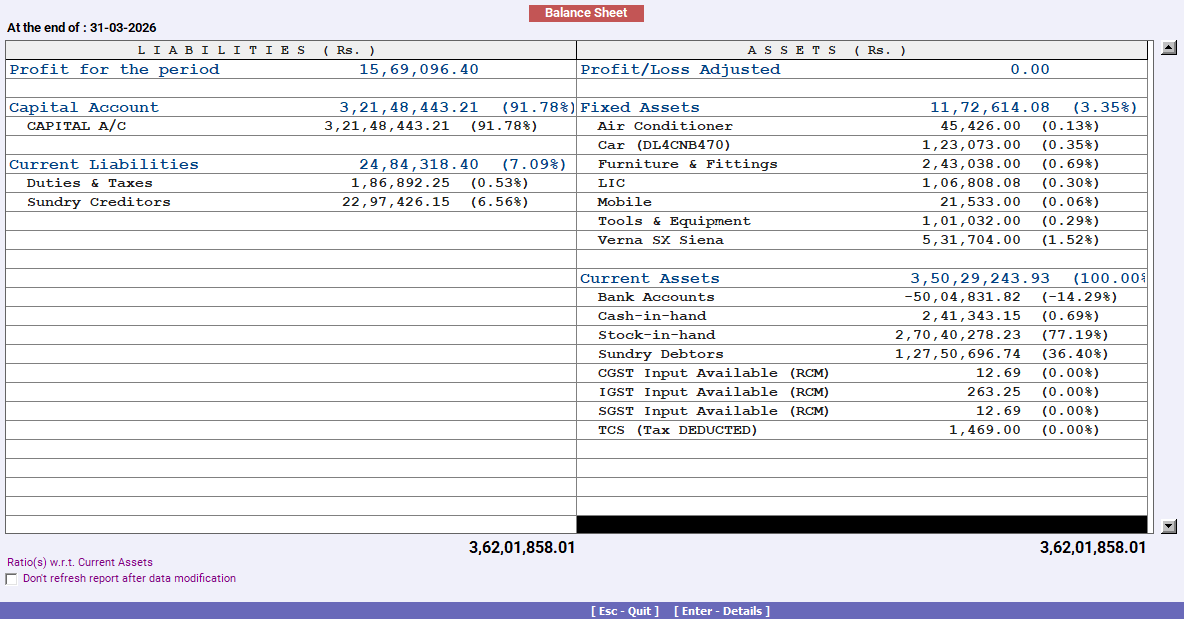
A balance sheet is a snapshot of your business position as of a single date. It shows you what you own, what you owe, and what remains for you as an owner. If you want a clean and easy way to track this, a balance sheet format in Excel is the most practical option for many small businesses.
This page provides a ready-to-use balance sheet format that you can update monthly or at year's end without getting stuck in complex accounting terms.
India’s No.1 GST Billing & Accounting Software
check_circleLightning-Fast Billing with Barcode scanning
check_circleAuto E-Way Bill & E-Invoicing
check_circleMobile App
check_circleComplete Accounting
check_circleAdvanced Inventory Management
check_circleAuto Payment Reminders
check_circle1-Click GST Filing & Reconciliation
check_circle24*7 support
Why use a balance sheet format?
Many business owners track sales and expenses, but still do not know their business's real position. Profit can look good, but cash can still be tight. A proper Excel balance sheet helps you see the full picture clearly.
With an Excel sheet, you can keep assets and liabilities in one place, update values monthly in a few minutes, avoid manual calculation errors with formulas, and share the statement easily with a CA, partner, or bank.
Download free Balance Sheet Format in Excel. Customize it as per your requirement with zero cost.
Download the balance sheet format in Excel sheet
Use this ready-made balance sheet format to edit and populate it with your latest values. Save it monthly, and your business position becomes easier to track.
What do you get in this Excel sheet?
- Auto totals so your totals are calculated instantly as you update values
- Fully editable fields so you can add or remove heads as per your business
- All required balance sheet heads are included, like assets, liabilities, and owner’s funds
Who Should Use This Excel Balance Sheet Format?
This Excel balance sheet format works well for small traders and shop owners, service businesses and freelancers, wholesalers and distributors, manufacturers and small units, and startups and growing MSMEs.
If you apply for a loan, vendor credit, or enter into investor discussions, a balance sheet is usually one of the first documents requested.
What Does a Balance Sheet Show in Simple Words?
A balance sheet has three main parts:
1) Assets
Things your business owns or will receive. Example: cash, stock, debtors, machines.
2) Liabilities
Things your business owes. Example: loans, unpaid bills, and taxes payable.
3) Owner’s Capital
Your investment plus retained profit, after adjusting drawings.
What is the basic rule to remember?
Total Assets = Total Liabilities + Owner’s Capital
This is why it is called a balance sheet. Both sides should match.
What is included in a balance sheet format in Excel sheet?
Your Excel format should include these sections. This is also why using an Excel sheet is helpful, because it already has the required headers in place, and you only need to update the values.
Assets
A. Current Assets (used within 12 months)
Cash in hand
Bank balance
Accounts receivable (Sundry Debtors)
Stock or inventory
Advance paid to suppliers
Input GST credit (if you track it separately)
B. Non Current Assets (used for long term)
Machinery and equipment
Furniture and fixtures
Computers and office assets
Vehicles
Property (if owned by business)
Less: depreciation
Liabilities
A. Current Liabilities (to be paid within 12 months)
Accounts payable (Sundry Creditors)
Outstanding expenses
GST payable
TDS payable
Short-term borrowings
B. Long Term Liabilities
Term loans
Business loans
Other long-term payables
Owner’s Funds
Capital introduced
Add: Retained profit
Less: Drawings
How to use the balance sheet format in Excel?
Start with the date. Then fill in the figures step by step. Enter the date for the balance sheet you want. Fill in cash and bank balance from your records. Add debtors and creditors from your sales and purchase registers. Enter the stock value as per your stock summary. Update fixed assets only when you buy or sell assets. Apply depreciation yearly or monthly if you track it that way. Finally, check totals. Assets and liabilities should match.
Why does Excel help most here?
When your sheet has auto totals, you can quickly spot missing values because the totals will not match.
Tip: If totals do not match, the issue is usually wrong stock, a missing creditor, or an incorrect capital adjustment.
What are the common mistakes to avoid?
These are the most common reasons balance sheets look wrong.
- Treating personal expenses as business expenses.
- Forgetting to include the stock value.
- Missing outstanding expenses like rent, salary, and electricity. Ignoring depreciation completely for fixed assets.
- Mixing the loan EMI paid with the loan balance.
- Not adjusting drawings in capital.
When should you prepare a balance sheet?
You can prepare a balance sheet every month for a business review, every quarter for planning and GST reconciliation, at year's end for final accounts and tax filing, and before applying for loans or investor discussion. Even a monthly balance sheet gives you clarity on cash, dues, and overall health.