
Profit and Loss Format, Structure, and Required Details
You may be selling every day and receiving payments too. Still, one question remains in the mind. Are you actually making a profit?A profit and loss statement gives that answer as it shows your income, your expenses, and the final profit or loss for a selected period. If you want to track this without confusion, a profit and loss format in Excel is a simple and practical choice.
This page gives you a ready-to-use Excel template that also works as a profitability statement format. You can update it monthly, quarterly, or at year's end.
India’s No.1 GST Billing & Accounting Software
check_circleLightning-Fast Billing with Barcode scanning
check_circleAuto E-Way Bill & E-Invoicing
check_circleMobile App
check_circleComplete Accounting
check_circleAdvanced Inventory Management
check_circleAuto Payment Reminders
check_circle1-Click GST Filing & Reconciliation
check_circle24*7 support
What is a profit and loss statement used for?
This statement helps you understand business performance in real numbers. It is not only for year end.
It helps you check things like:
- Are expenses increasing every month?
- Is your gross profit going down?
- Are discounts and returns reducing your profit?
- Which expense is growing silently?
When you use a profit & loss format in Excel, totals update automatically. You spend less time calculating and more time understanding the result.
Download free Profit and Loss Format in Excel. Customize it as per your requirement with zero cost.
Download the profit and loss format in Excel sheet
Use this ready made Excel format to enter income and expenses and get profit totals instantly. Save it monthly, and you will always know where your money is going.
What do you get in this Excel sheet?
- Auto totals so gross profit and net profit are calculated as you enter values
- Fully editable fields so you can add or remove heads as per your business
- All required P&L heads are included, so you do not miss key sections like direct costs and operating expenses
Who should use this profitability statement format Excel?
This format fits most small businesses, especially for retail and trading businesses, service providers, freelancers, wholesalers, distributors, manufacturers, and growing MSMEs. It is also helpful if you want to share the monthly performance with a partner, a CA, or a bank.
What does a profit and loss statement show?
A profit and loss statement shows profit at two levels.
Gross profit shows if your pricing and direct costs are under control.
Net profit is the amount left after all business expenses.
The basic idea is simple.
Net Profit = Total Income minus Total Expenses
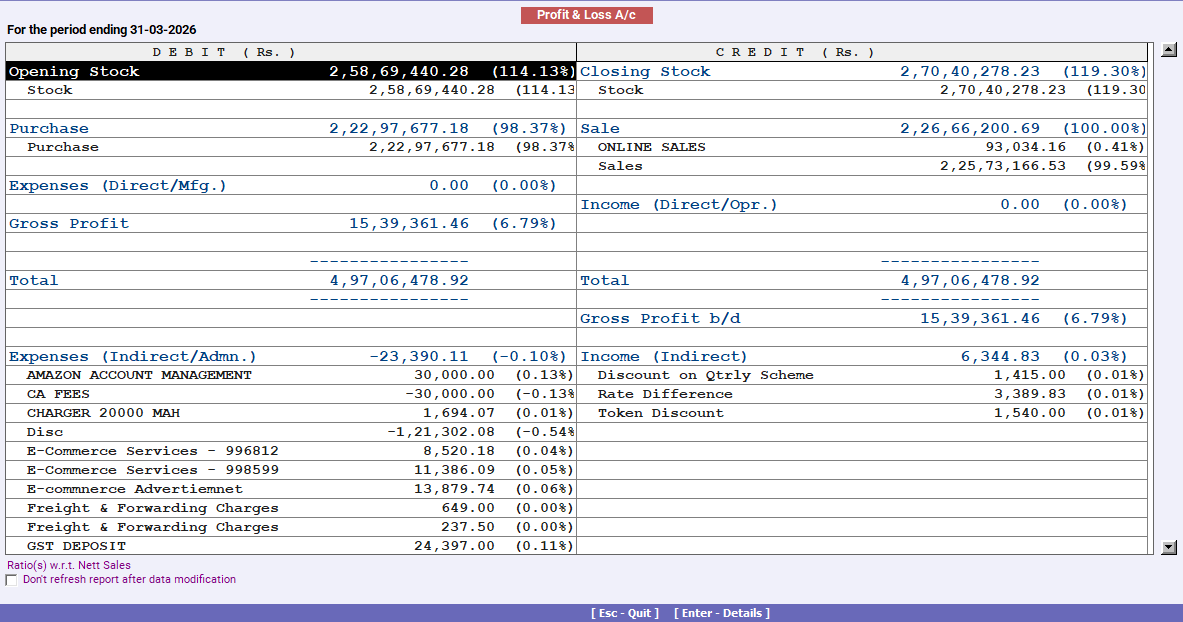
If you sell products and maintain inventory, stock values also affect profit. Are you updating opening stock and closing stock correctly? If not, your profit figure can look wrong.
What Should Be Included in a Profit and Loss Format in Excel?
A good P&L Excel format should include these sections.
Income
This is your earnings for the period. Add sales or service income first. If you have other income, such as commissions or interest, add it separately to keep it clear.
Direct Costs
These are costs directly linked to sales. Purchases are the main head here. You can also include direct expenses such as freight inwards, packaging, job work, and production-related charges.
If you track inventory, add opening stock and closing stock in this section. Opening stock is added because it is part of the goods sold. Closing stock is reduced because it remains unsold.
Operating Expenses
These are the business's regular operating expenses. Rent, salary, electricity, internet, office expenses, repairs, marketing, travel, and bank charges usually fall under this category.
Other Costs and Adjustments
Some costs are not regular but still affect profit. Interest on loans, depreciation of assets, bad debts, and one-time expenses may be included here if applicable.
At the end, your sheet should clearly show gross profit and net profit.
How to use the profit and loss format in Excel?
Here are some simple steps to keep it simple.
- Enter the month or date range
- Fill in income first
- Add purchases and direct expenses
- If inventory is involved, enter the opening stock and closing stock
- Enter operating expenses
- Add interest and depreciation if applicable
- Check gross profit and net profit
If profit looks too high or too low, what could be wrong? Most often, it is missing expenses, wrong stock values, or wrong classification between direct costs and operating expenses.
Common mistakes to avoid
These mistakes usually create wrong profit numbers:
- Missing small expenses that happen often
- Mixing personal expenses with business expenses
- Treating asset purchases as expenses
- Not adjusting the opening stock and closing stock
- Putting direct costs inside operating expenses, or the other way around
- Ignoring depreciation and interest when they apply
When should you prepare a profit and loss statement?
You can prepare it monthly to track profits and control expenses. You can also prepare it quarterly for review and planning, and at year's end for final accounts and tax filing.
A monthly profit and loss statement removes guesswork and helps you run the business with clarity.