
Quotation Format Sample, Structure, and Correct Usage for Businesses
Many small business owners share prices with customers via WhatsApp or email without proper documentation, and that leads to disagreement with customers over rates, quantities, or terms. A correct quotation format avoids confusion, builds trust, and helps you avoid errors before creating a bill. Incorrect or incomplete quotations often lead to disputes, delayed orders, or rejected invoices. In this guide, you will understand what a quotation is, when to use it, mandatory fields, common mistakes, and how to create a professional quotation easily for your business.
India’s No.1 GST Billing & Accounting Software
check_circleLightning-Fast Billing with Barcode scanning
check_circleAuto E-Way Bill & E-Invoicing
check_circleMobile App
check_circleComplete Accounting
check_circleAdvanced Inventory Management
check_circleAuto Payment Reminders
check_circle1-Click GST Filing & Reconciliation
check_circle24*7 support
What is a Quotation Format, and When Is It Used?
A quotation, often called a pro forma invoice in practice, is a document shared before the actual sale. It tells the customer what you are offering, at what price, and under which conditions. Businesses use quotations for product sales, services, tenders, bulk orders, or custom work. Once the customer accepts it, the quotation serves as the basis for issuing the final invoice. It is not a tax document, but it serves as a commercial commitment.
Download Free Quotation Format in Word, Excel, or PDF. Customize it as per your requirement with zero cost.
Mandatory Fields in Quotation Format
Quotation Number and Date
Helps track and refer to the quotation later.
Common Mistake: Sending quotations without numbers.
Impact: Confusion during follow-ups or billing.
Seller Details
Business name, address, and contact details.
Common Mistake: Missing phone number or business name.
Impact: Looks unprofessional and reduces trust.
Customer Details
Customer name and address.
Common Mistake: Writing “to whomsoever concerned”.
Impact: Customer may later deny acceptance.
Description of Goods or Services
Provide clear details about the product or service offered.
Common Mistake: Vague descriptions.
Impact: Price or scope disputes.
Quantity and Rate
Shows how pricing is calculated.
Common Mistake: Lump-sum pricing without a breakdown.
Impact: Customer confusion or negotiation issues.
Taxes and Charges
Mention GST or clearly state whether prices are inclusive or exclusive.
Common Mistake: Not clarifying tax applicability.
Impact: Billing mismatch later.
Validity Period
Defines how long the quotation is valid.
Common Mistake: No validity mentioned.
Impact: Customer may demand old prices later.
Terms and Conditions
Delivery timeline, payment terms, and warranty (if any).
Common Mistake: Skipping payment terms.
Impact: Payment delays.
Sample Quotation Format
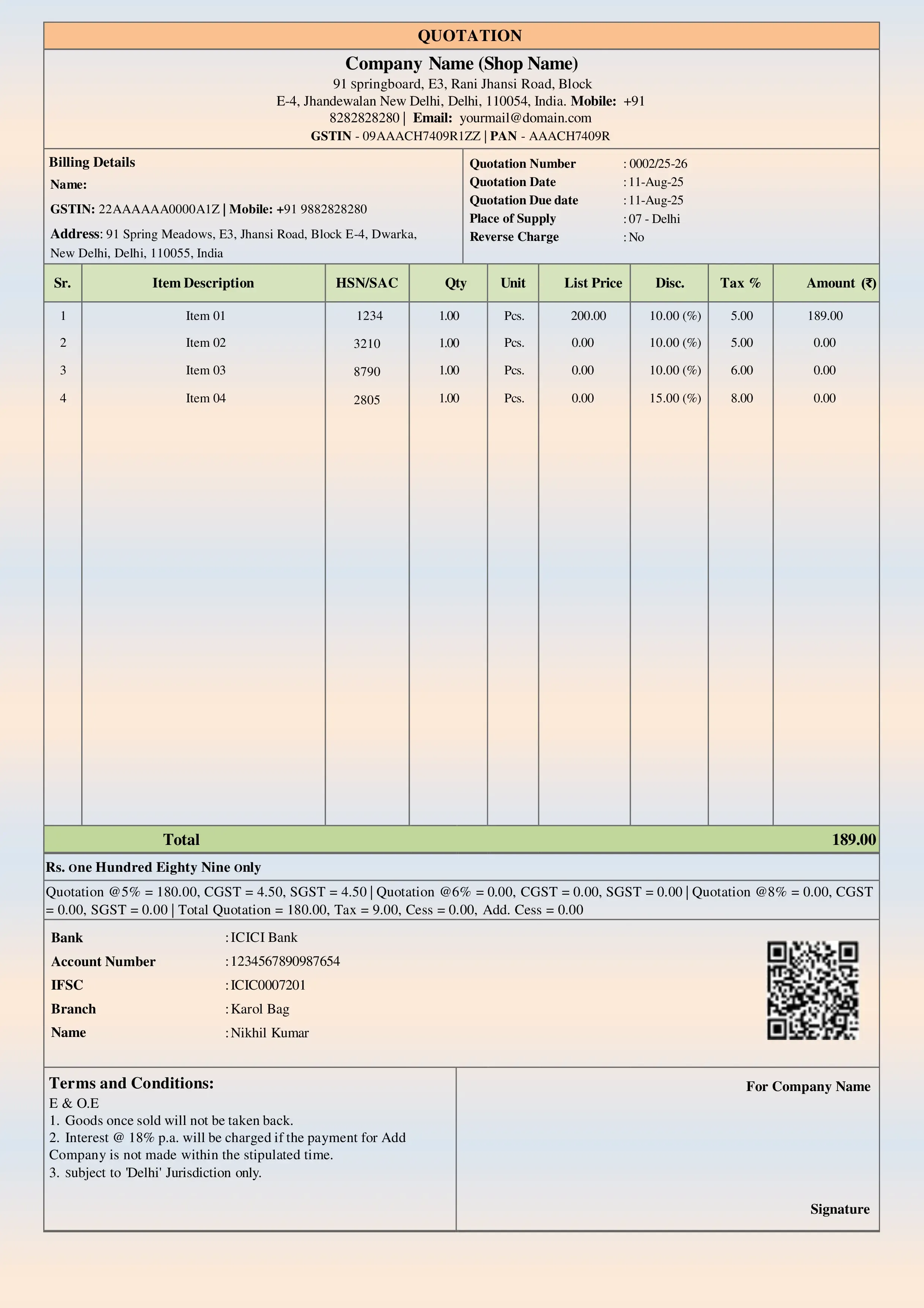
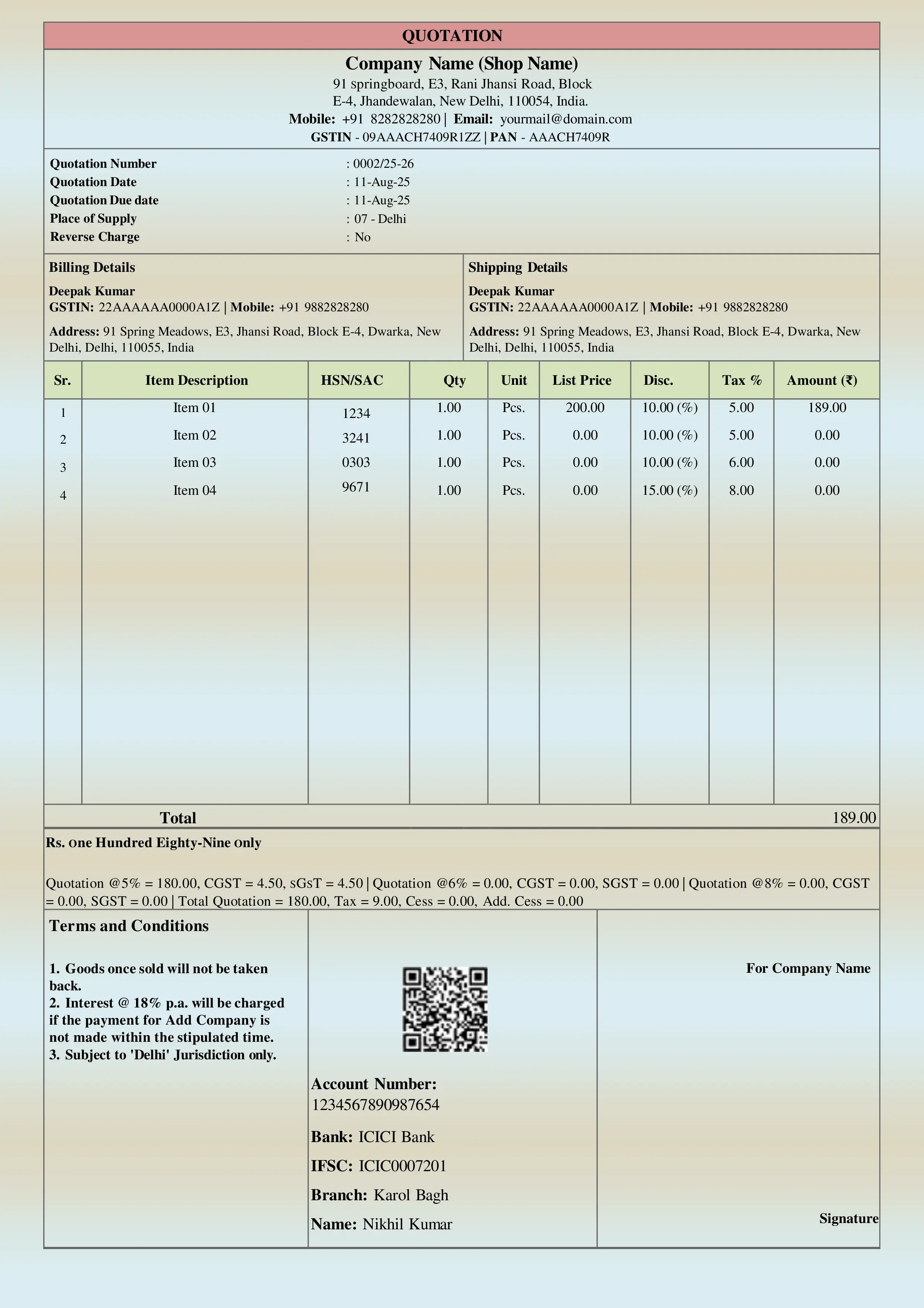
A standard sales quotation format starts with seller and customer details at the top, followed by quotation number and date. The middle section contains a table showing item or service description, quantity, rate, and amount. Taxes and total value are shown below. At the bottom, the validity period and terms are mentioned. Businesses commonly use quotation format in Word, quotation format in Excel, or quotation format in PDF, depending on the use case.
How to Create a Quotation Easily?
Many SMEs download a free quotation format in Word or a quotation format in Excel for basic needs. While Excel templates, like a sample quotation template, require manual checks. Accounting software like BUSY allows businesses to create professional quotations and convert them directly into invoices without manual effort.
Conclusion
Using the correct quotation format helps avoid misunderstandings, enhances professionalism, and increases order conversion. It sets clear expectations before billing and protects both seller and buyer. Using structured formats and software such as BUSY enables SMEs to create accurate quotations, easily convert them into invoices, and manage their sales process with confidence and clarity.
Explore Accounting & Billing Software for Small Businesses
Frequently Asked Questions
-
Is a quotation legally binding?
A quotation becomes binding once the customer accepts it in writing or by email.
-
Can GST be shown on a quotation?
Yes, GST can be shown for clarity, but the tax is applicable only at the invoice stage.
-
What is the difference between a quotation and a proforma invoice?
In practice, both are used similarly. A pro forma invoice closely resembles an invoice and is often used for formal approval.
-
Can I edit a quotation after sending it?
You can revise it, but always issue a new quotation number.
-
Is a handwritten quotation allowed?
Yes, it is allowed, but not recommended for professional or GST-related transactions.