
Sales Report Format Sample, Structure, and Correct Usage for Businesses
Many small businesses track their daily sales but still struggle to identify where growth is coming from or where money is leaking. This usually happens because sales data is not recorded in a proper sales report format. Without having a clear report, owners cannot track daily performance, staff sales, or monthly trends. Reporting errors often lead to incorrect business decisions and GST mismatches. In this guide, you will learn what a sales report is, which format to use, mandatory fields, common mistakes, and how SMEs can maintain accurate sales reports easily.
India’s No.1 GST Billing & Accounting Software
check_circleLightning-Fast Billing with Barcode scanning
check_circleAuto E-Way Bill & E-Invoicing
check_circleMobile App
check_circleComplete Accounting
check_circleAdvanced Inventory Management
check_circleAuto Payment Reminders
check_circle1-Click GST Filing & Reconciliation
check_circle24*7 support
What is the Sales Report Format and When Is It Used?
A sales report is a structured summary of sales transactions for a specific period, such as daily, weekly, or monthly. It helps businesses track total sales, payment methods, outstanding amounts, and product performance. For example, a shop owner uses a daily sales report format to check how much was sold in cash and how much on credit. A The monthly sales report helps management analyse trends and plan inventory and targets for upcoming month.
Download Free Sales Report Format in Word, Excel, or PDF. Customize it as per your requirement with zero cost.
Mandatory Fields in Sales Report Format
Date or Reporting Period
Shows the day or time range for which sales are recorded.
Common Mistake: Mixing multiple days in one report.
Impact: No clarity on daily performance.
Invoice or Bill Number
Helps verify reported sales with actual invoices.
Common Mistake: Skipping invoice reference.
Impact: GST reconciliation issues.
Customer or Channel Details
Customer name, counter name, or sales channel.
Common Mistake: Clubbing all details without a breakup.
Impact: No insight into customer behaviour.
Product or Service Details
Item name, quantity, and value.
Common Mistake: Recording only the total sales value.
Impact: Poor inventory and pricing decisions.
Taxable Value and GST
Shows GST applicable on sales.
Common Mistake: Not separating tax from sales value.
Impact: Errors in GST returns.
Payment Mode
Cash, UPI, card, or credit.
Common Mistake: No tracking of payment modes.
Impact: Cash mismatch and follow-up issues.
Total Sales Amount
Final total of the report.
Common Mistake: Manual calculation errors.
Impact: Wrong profit and cash flow view.
Sample Sales Report Format
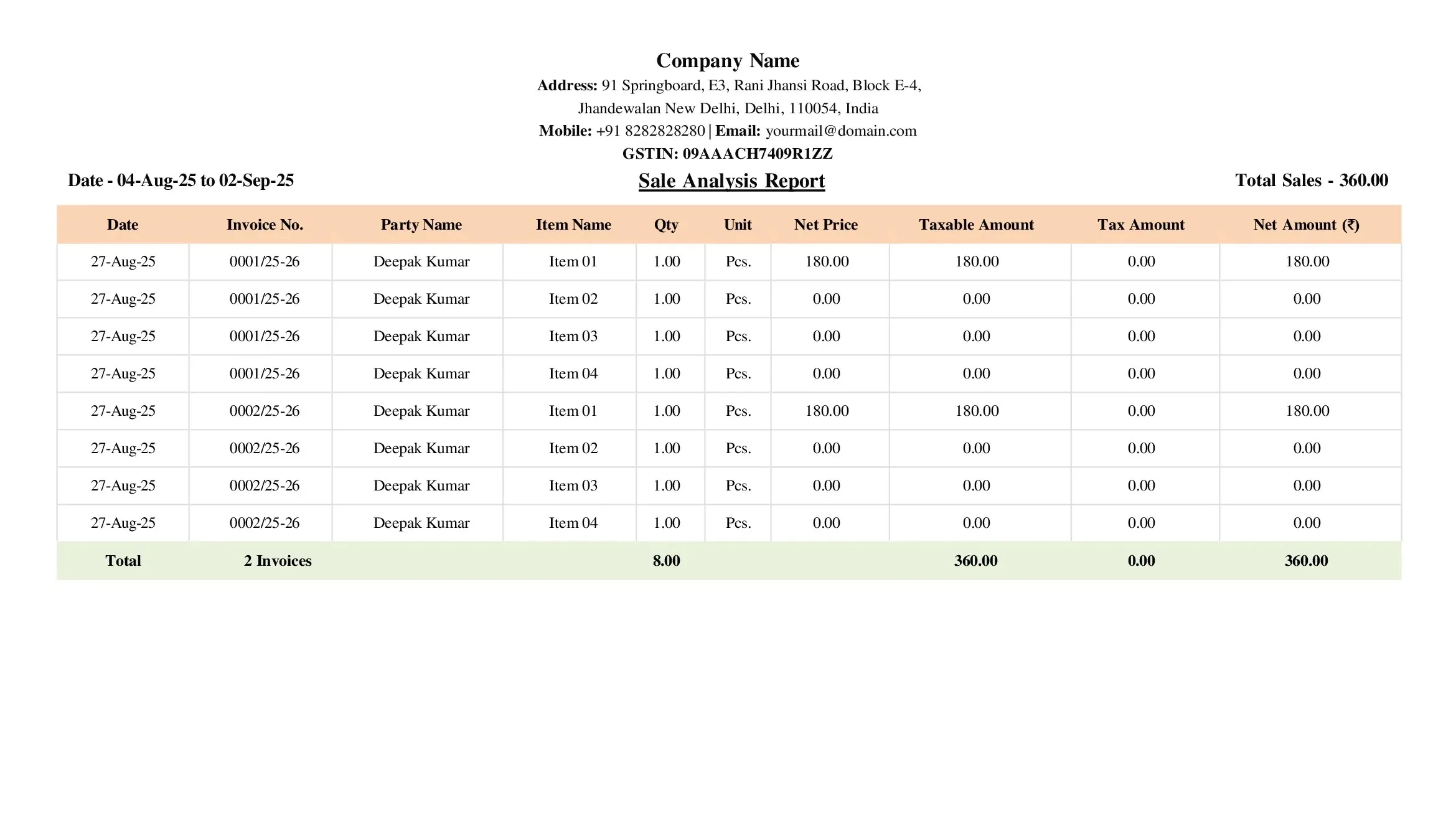
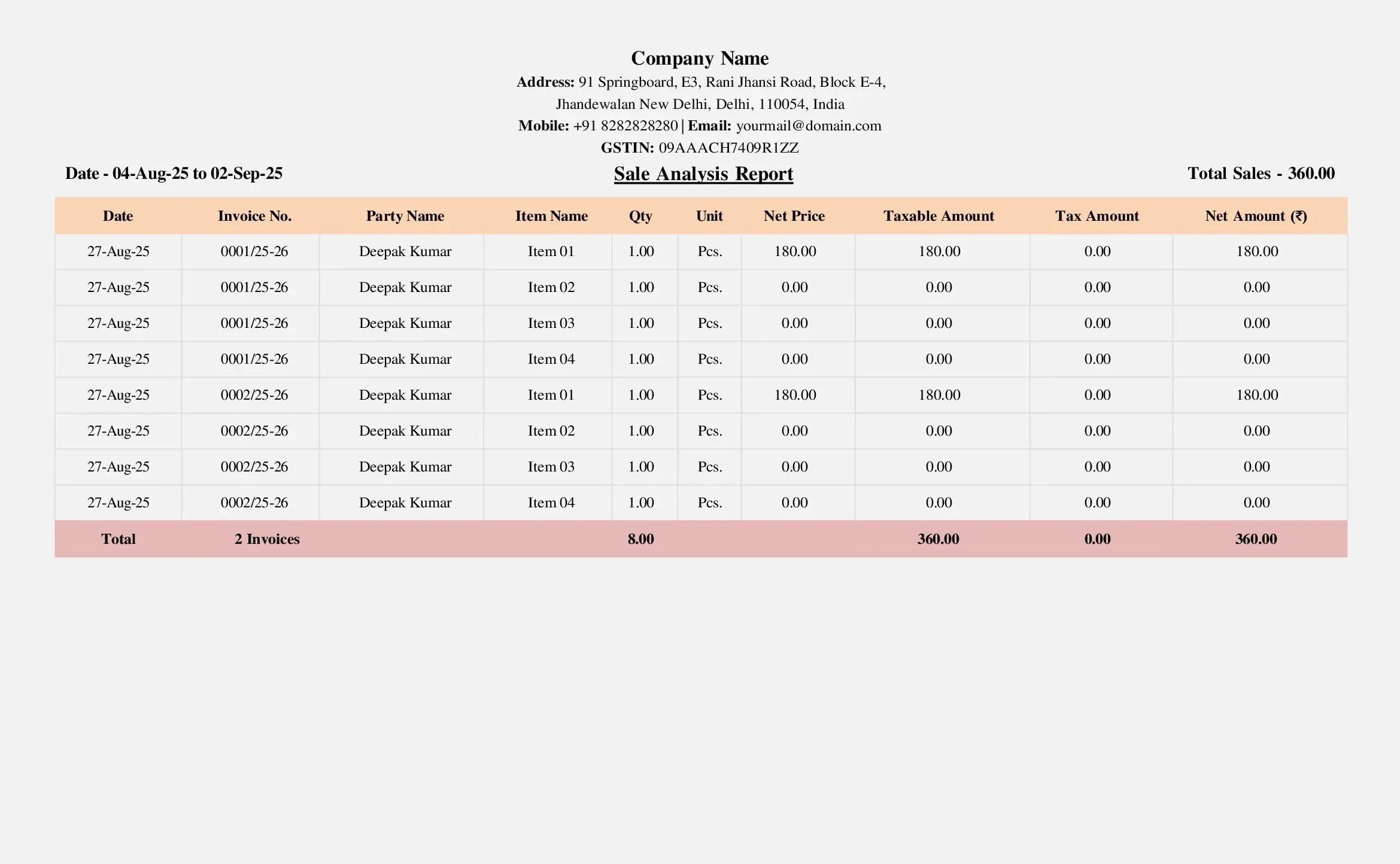
A standard sales report format in Excel is usually table-based. It includes date, invoice number, customer name, sales value, tax amount, payment mode, and total. A daily sales report sample focuses on one day’s transactions, while a monthly sales report sample summarises sales for the entire month. Small businesses commonly maintain a daily sales report template in Excel for quick review and reporting.
How to Create a Sales Report Easily?
Many SMEs download a free Excel sales report template or a Word sales report template. While the Excel-based daily sales report format works initially, it requires discipline and regular updates. Accounting software automatically generates daily and monthly sales reports, as well as GST-ready reports. BUSY software helps businesses generate accurate sales reports instantly without manual effort and ensures data consistency across billing and accounts.
Conclusion
A well-maintained sales report format gives clarity on business performance, cash flow, and growth trends. It helps SMEs take informed decisions and stay GST-ready. Using structured formats and software like BUSY reduces reporting errors, saves time, and gives business owners confidence and control over their sales data.
Explore Accounting & Billing Software for Small Businesses
Frequently Asked Questions
-
What is a daily sales report?
A daily sales report shows all sales transactions for a single day, including payment modes and totals.
-
Is a sales report mandatory for small businesses?
It is not legally mandatory, but it is essential for tracking performance and compliance.
-
Can the sales report be maintained in Excel?
Yes, many SMEs use a sales report sample Excel format, but accuracy depends on correct data entry.
-
What is the difference between a sales report and a sales register?
A sales register records transactions, while a sales report summarises and analyses them.
-
Does the sales report help in GST filing?
Yes, accurate sales reports support GST returns and reconciliation.