Delivery Challan Format Sample, Rules, and Mandatory Fields
Many small businesses send goods for delivery without issuing an invoice immediately, which is where the issue begins, as it often leads to GST mismatches, stock discrepancies, or ITC confusion later. Using the correct delivery challan format is important; missing fields can cause issues during audits or returns. In this guide, you will learn when to use a delivery challan, which fields are mandatory, common mistakes SMEs make, and how to create a challan correctly without compliance stress.
Download Delivery Challan FormatWhat is a Delivery Challan, and When Is It Used?
A delivery challan is a document issued when goods are moved without a tax invoice being issued at that time. It is commonly used for stock transfer, job work, approval basis, free samples, or goods sent for repair. For example, when you send material to another branch or send goods to a customer for trial, a delivery challan is used instead of an invoice. It helps track the movement of goods and stock while remaining GST-compliant.
Download free Delivery Challan format in Word, Excel, or PDF. Customize it as per your requirement with zero cost.
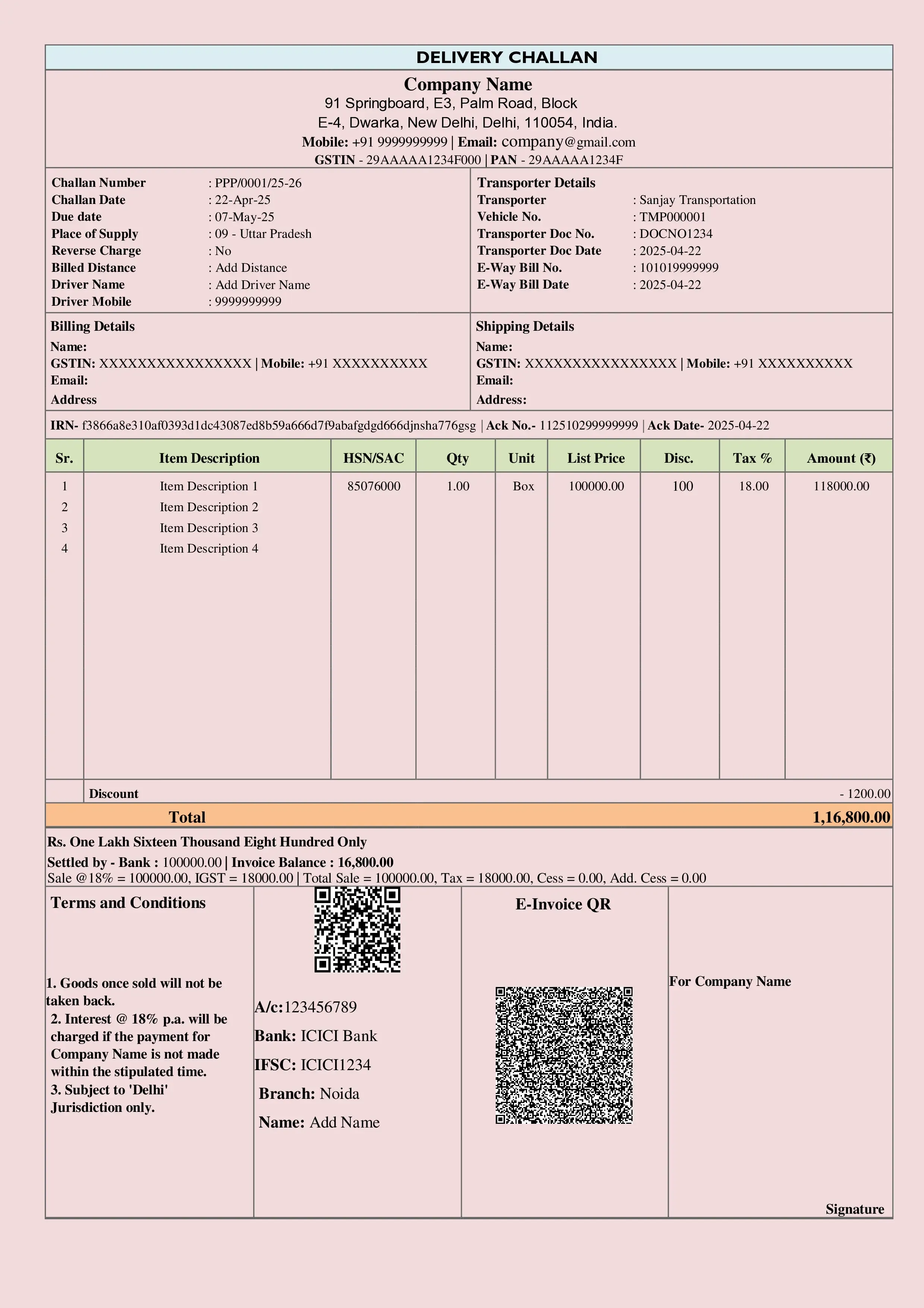
Delivery Challan Format-1
Delivery Challan Format-1
A delivery challan format for goods sent on job work or transferred between branches and godowns without a tax invoice. Records item quantity, description, and destination for GST compliance. Download in Word, Excel and PDF.
Delivery Challan Format-2
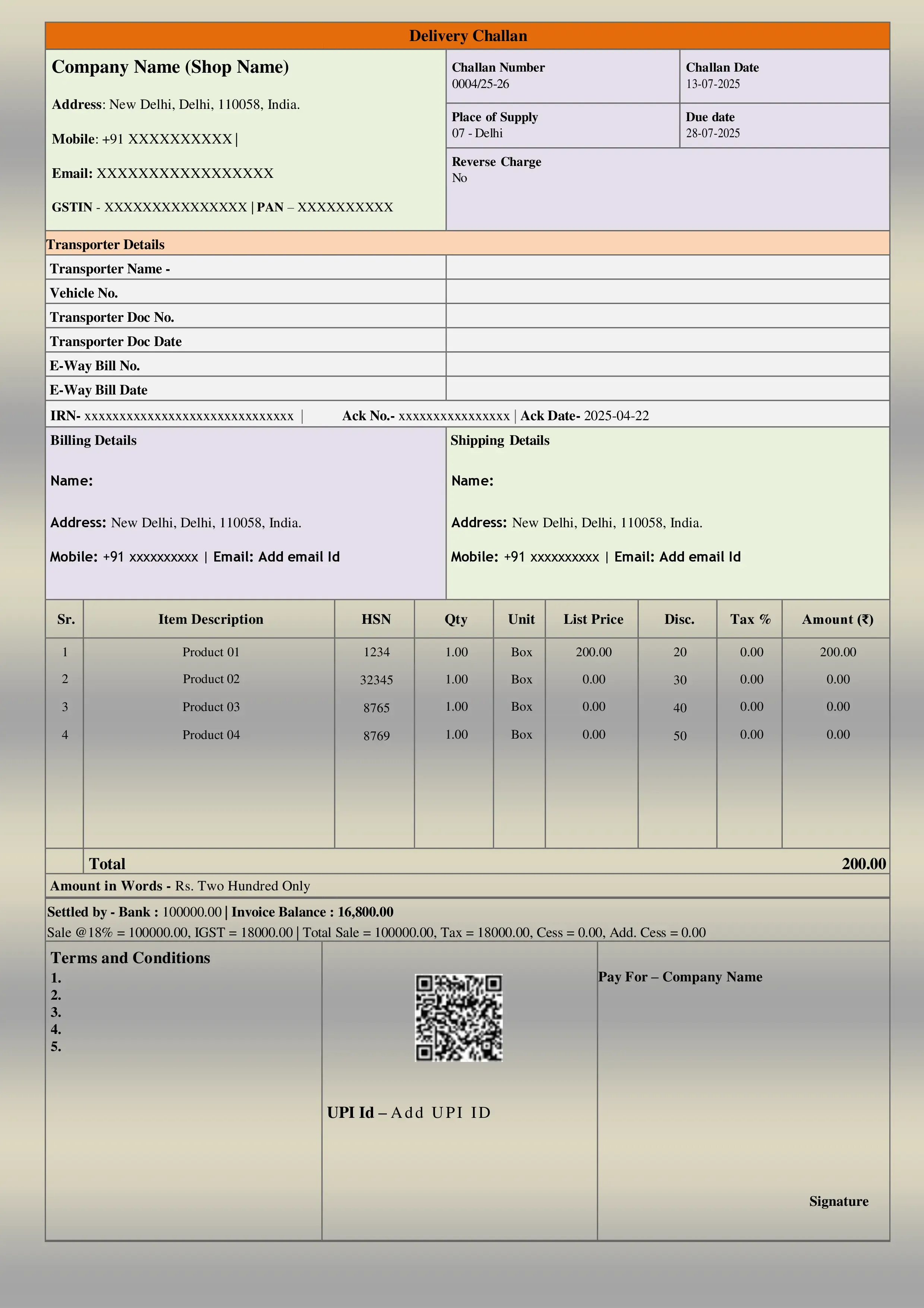
Delivery Challan Format-2
A delivery challan format for dispatching free samples, promotional goods, or items sent on approval that are not meant for immediate sale. Marked as Not for Sale for GST and audit compliance. Download in Word, Excel and PDF.
Mandatory Fields in Delivery Challan Format
| Field | Details | Common Mistake | Impact |
|---|---|---|---|
| Delivery Challan Number and Date | This helps track goods movement and link it to an invoice later, if required. | Using random numbers or duplicate challan numbers. | Audit confusion and document mismatch. |
| Supplier Details | Business name, address, and contact details. | Missing GSTIN or incomplete address. | Problems during GST scrutiny or e-way bill generation. |
| Recipient Details | Name and address of the person or branch receiving goods. | Writing short names or internal codes only. | Delivery and follow-up issues. |
| Description of Goods | Clear product or service details. | Writing “material” or “items” without details. | Stock reconciliation issues. |
| HSN Code | Required mainly for registered businesses and goods movement. | Leaving HSN blank for stock transfer. | GST compliance gaps. |
| Reason for Delivery | Such as job work, free samples, stock transfers, approval basis, or repairs. | Not mentioning the reason clearly. | GST officer may treat it as a sale. |
| Signature and Transport Details | Signature of sender and transporter details, if applicable. | No signature or missing vehicle details. | Delivery proof issues. |
Sample Delivery Challan Format
A standard goods delivery challan format typically includes a header with company details, followed by the challan number and date, followed by the recipient details. The middle section contains a table of product details, including description, quantity, and HSN. At the bottom, the delivery reason, signature, and remarks are added. Unlike an invoice, there is no breakdown of taxes or the total GST amount shown. Note: For GST-registered businesses, this format changes slightly when linked to e-way bill details.
How to Create a Delivery Challan Easily?
Manually creating a blank delivery challan works for very small volumes but increases the risk of errors. Software for online delivery challan creation saves time, maintains numbering, automatically links stock, and helps generate e-way bills easily. Software like BUSY allows SMEs to create challans for free samples, stock transfers, courier deliveries, and not-for-sale movements while keeping records clean and compliant.
Conclusion
Using the correct delivery challan format is more than just paperwork; it is essential for protecting your business from GST confusion, stock errors, and audit stress. When goods move without sale, a properly filled challan ensures transparency and compliance. With the right processes and software, such as BUSY, SMEs can confidently manage deliveries and focus on growing their business without worrying about documentation errors.
Manage Your Delivery Challan Easily with BUSY Accounting Software
Lightning-Fast Billing with Barcode scanning
Auto E-Way Bill & E-Invoicing
Mobile App
Complete Accounting
Advanced Inventory Management
Auto Payment Reminders
1-Click GST Filing & Reconciliation
24*7 support