AI Voucher Scan in BUSY: Scan Bills and Create Vouchers

AI Voucher Scan helps businesses reduce manual purchase bill entry by automatically capturing invoice details and converting them into vouchers. It reads important information such as supplier details, items, quantities, rates, taxes, and totals, helping users create vouchers faster with fewer manual entries.

Trusted by 6,00,000+ Businesses

Let AI Handle Your Bill Entry

Convert purchase bills into vouchers faster with automatic data capture and easy verification.

AI-Powered Scanning
Smart Data Extraction
Quick Voucher Creation
+91

* No credit card required

Trusted by Businesses, Rated by Experts

How BUSY Helps You Create Vouchers Faster

document_scanner

Scan Purchase Bills to Capture Details Automatically

auto_awesome

Extract Supplier, Item, Tax & Invoice Information

fact_check

Review & Edit Details Before Saving Vouchers

bolt

Reduce Manual Data Entry and Improve Accuracy

How to Use AI Voucher Scan in BUSY

Important Points to Note

  • Supported in BUSY MAGIC Version 1.2 and above
  • Supports PDF and image file formats (.jpg, .jpeg, .png)
  • Supports up to 10 pages per purchase bill
  • Not available in Demo Mode
  • An internet connection is required

Step 1: Open the Purchase Voucher
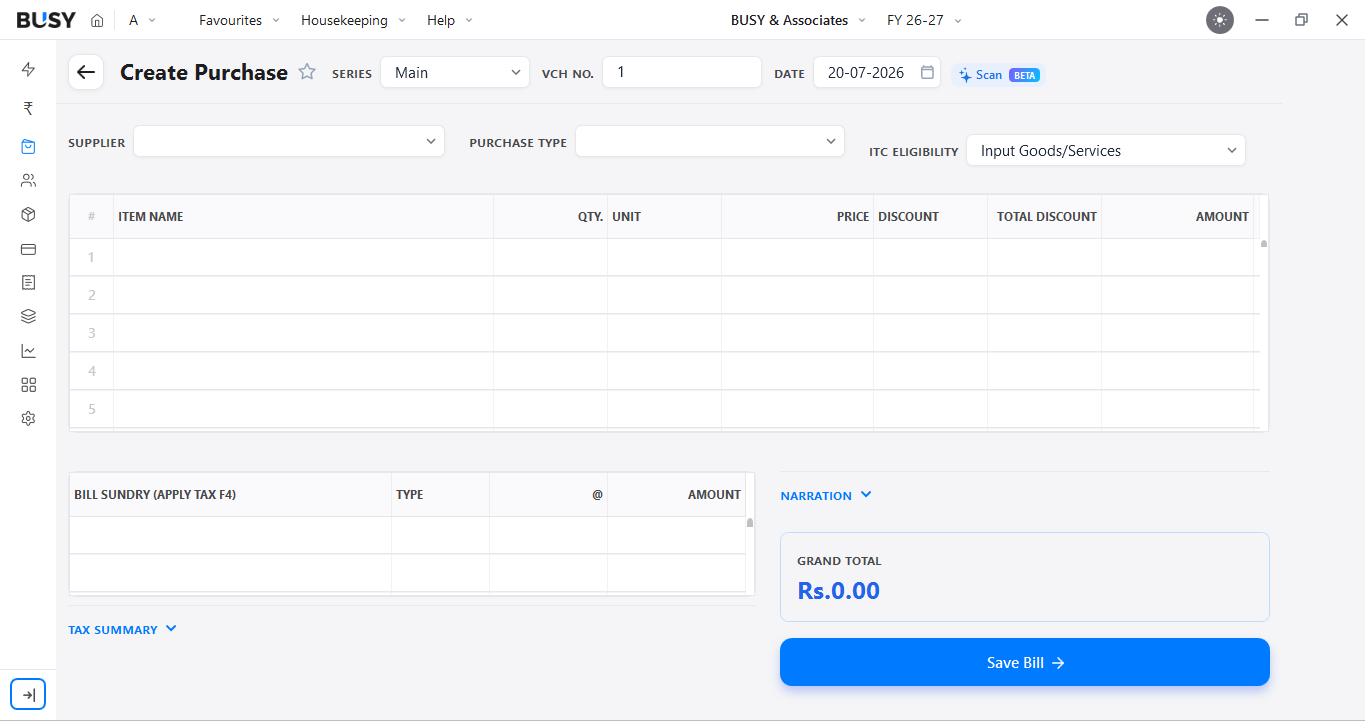
Scan option on the Create Purchase screen in BUSY

Go to the Purchase menu and click the + icon to open the Create Purchase screen. Click Scan in the top-right corner.

Step 2: Upload the Purchase Bill
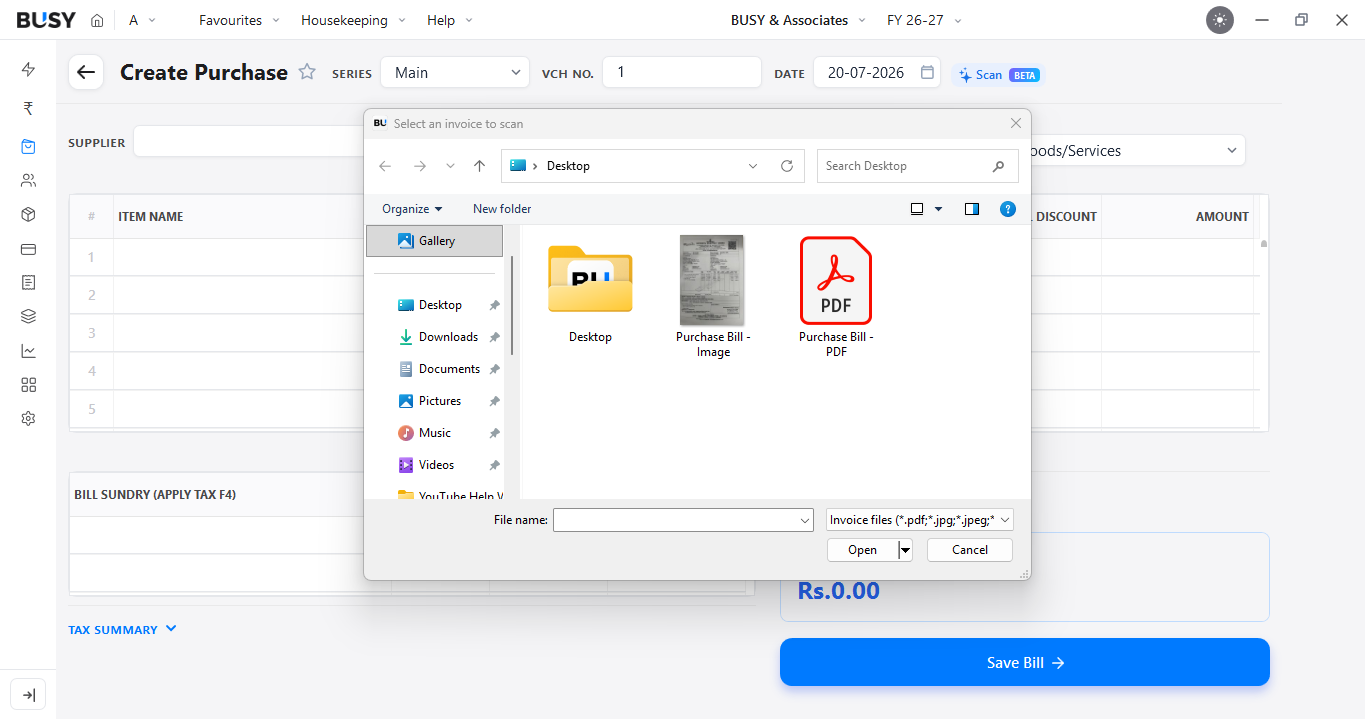
Selecting a purchase bill image or PDF to scan

Select an image or PDF from your local files. BUSY scans the document and captures the available invoice details. Any details that cannot be identified are flagged for review.

Step 3: Create or Map the Supplier, If Required
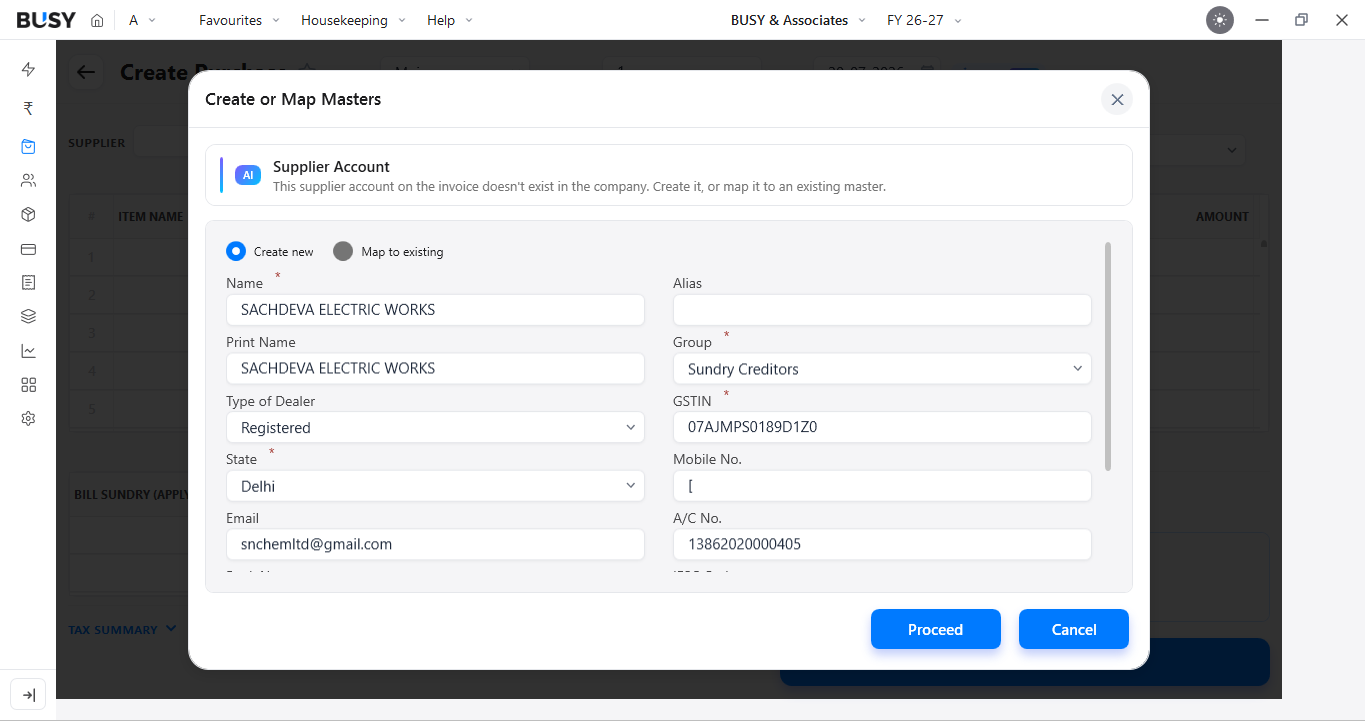
Create or map the supplier account detected on the invoice

If the supplier is not already available in BUSY, create a new supplier master or map it to an existing master. Click Proceed after completing the mapping.

Once mapped, BUSY can identify the supplier when processing future invoices from the same supplier.

Step 4: Create or Map the Unit, If Required
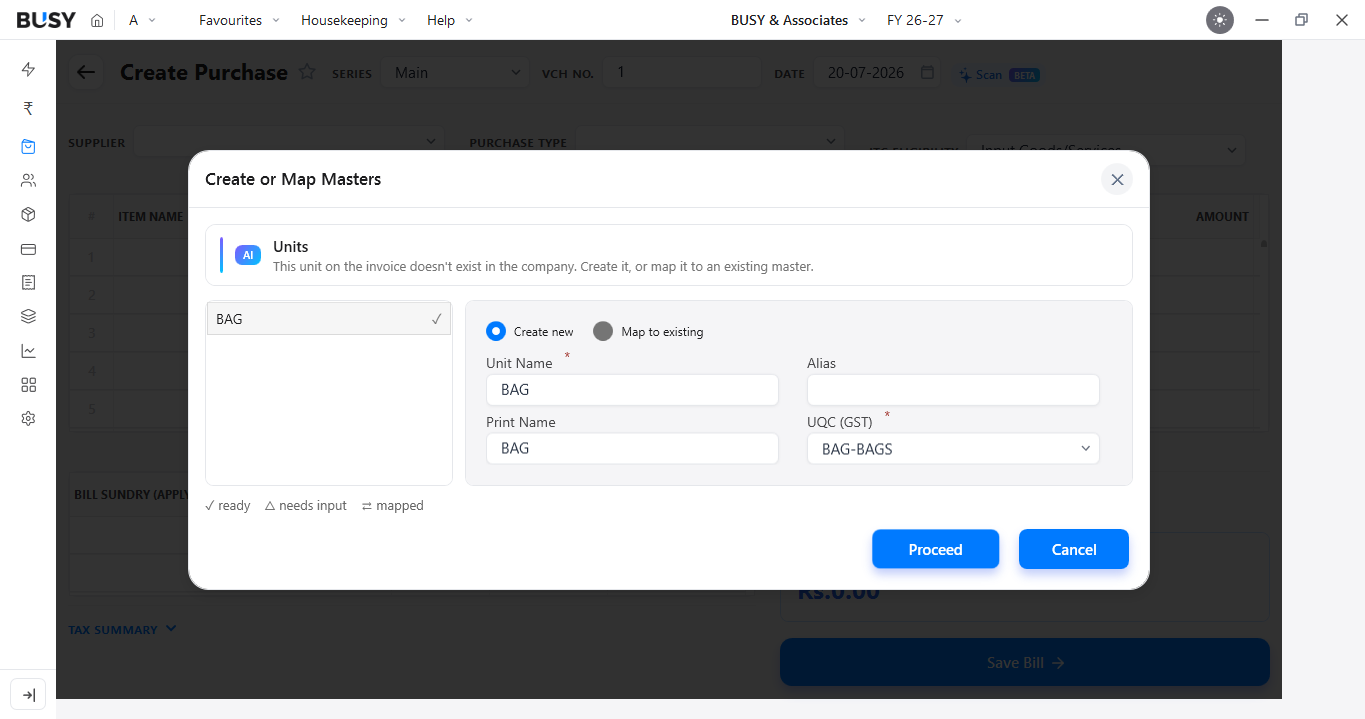
Create or map the unit detected on the invoice

If the required unit is not available in BUSY, create a new unit or map it to an existing unit. Click Proceed to continue.

Step 5: Create or Map the Item, If Required
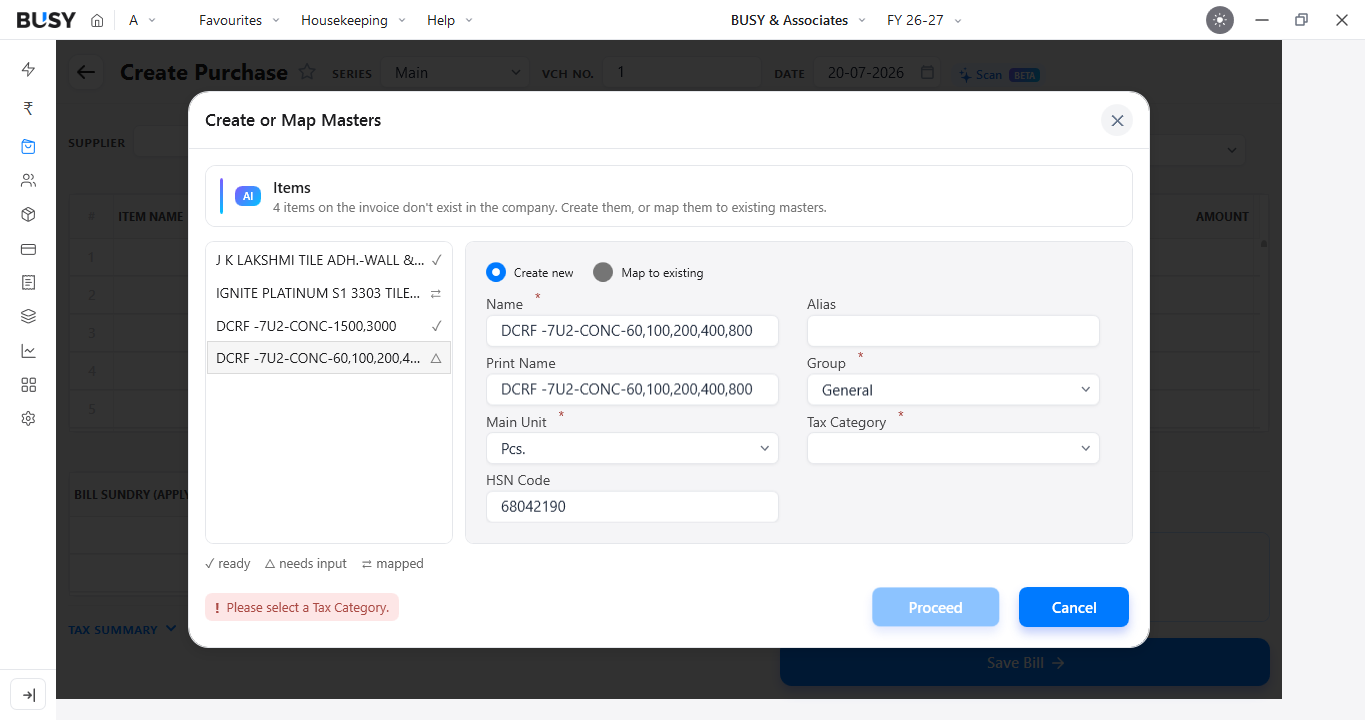
Create or map the items detected on the invoice

If an item is not already available in BUSY, create a new item or map it to an existing item master.

When creating a new item, make sure you select the correct Tax Category. Click Proceed to continue.

Step 5: Review and Save the Bill
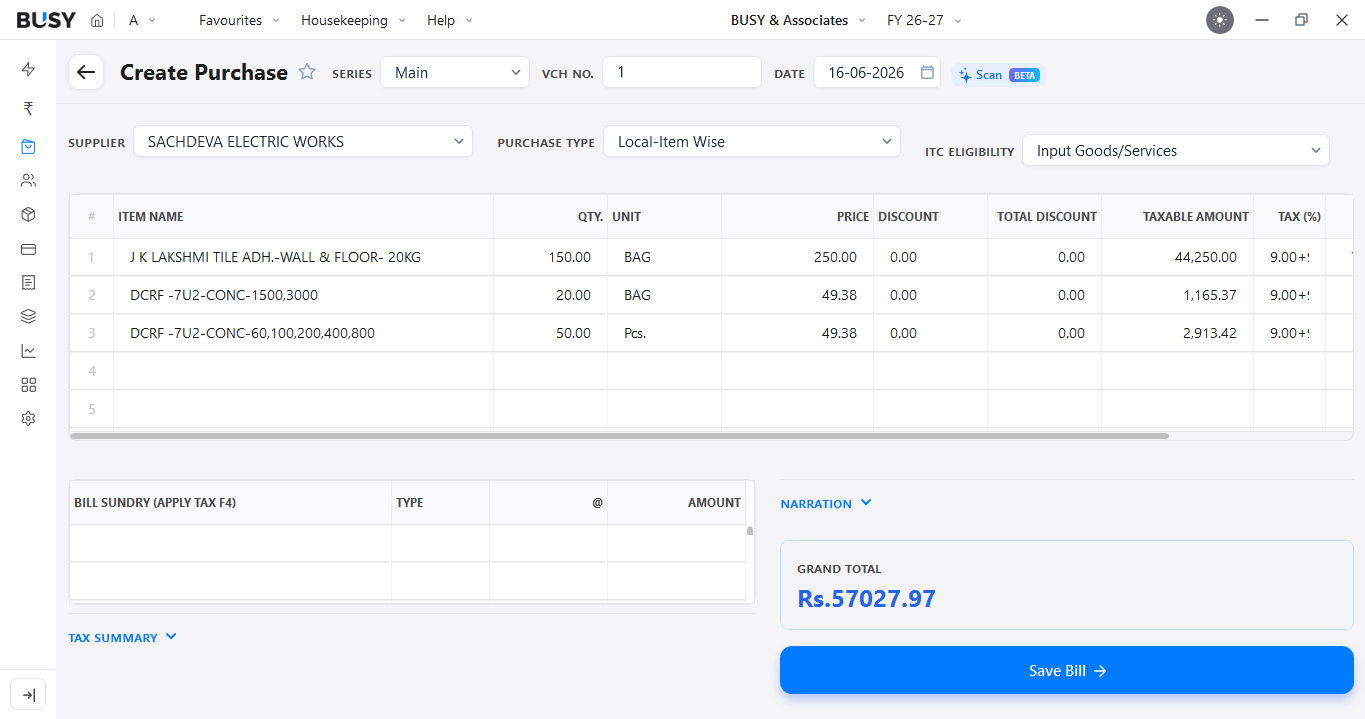
Captured purchase bill details ready for review and saving

Review the captured bill details carefully, including the supplier, items, quantities, rates, taxes and invoice total.

Make any required corrections and click Save Bill once the details are verified.

What Our Customers Say

Real experiences from businesses across India.

"Mobile Access and GST Tools for Better Business Control"

BUSY features a dedicated Mobile App to check stock, share invoices on WhatsApp, and view reports from your phone. It also helps manage GST processes with features like auto-applying GST rates on invoices and GSTR-1, GSTR-2A, GSTR-2B, and GSTR-3B reconciliation.

Prasad

CEO (Chief Executive Officer)

"Feature-Rich and Cost-Competitive Accounting Software"

BUSY Accounting Software is the best software in this industry as it provides the best features for billing, accounting, inventory, and GST.

Lavkush S.

CEO (Chief Executive Officer)

"Easy Reports, Invoicing, and Daily Accounting Management"

The software is excellent for individuals who manage account entries personally. You can easily generate reports, check daily entries, create invoices, and reconcile bank entries. Awesome.

Jagat S.

Sr. System Admin

"Simple Accounting Solution for Businesses of All Sizes"

Every good accounting software handles financial work and many other tasks related to firms, businesses, warehouses, and more. BUSY is very easy to learn and use. Someone with basic computer knowledge can easily understand the complete process.

Kamaljit

Accountant

"A User-Friendly Upgrade for Modern Accounting Needs"

Before, I was using Tally software, but for the past 3 years, I have been using BUSY Accounting Software. I have had a wonderful experience using this software. It has an extremely user-friendly interface and is easy to access.

Anant K.

Accountant

"Simple Software That Anyone Can Use"

Awesome software; even someone with a non-IT background can run it like a pro.

Ashish

Owner

"A Trusted Choice Among Accounting Solutions"

I have used many accounting software programs in the past. I find this software to be the best.

Giwa A.

CEO

"Easy Learning with Helpful Support"

Overall, the service is very good. Support is always provided on time, and the staff is very helpful.

Simranjit

Accountant

Flexible Plans for Every Business

Paid plans start at just ₹5,000/year. Whatever your size, from small business to scaling enterprise, there's a BUSY plan built for you, so pick what you need today and upgrade anytime.

Explore All Plans & Pricing arrow_forward

Enjoy More Accounting Benefits With BUSY

smartphone

Free Mobile App for access on the go

history

Complete control over the User Activity Log

backup

Auto-Backup through Google Drive

See How BUSY Works in a Real Business Day

Introducing BUSY Magic

Frequently Asked Questions

Clear answers to common queries about this feature.

What types of bills can I use with AI Voucher Scan?

You can use a clear scanned copy, image or PDF of a purchase bill. The document should be complete and readable for better results.

What details can AI Voucher Scan capture from a bill?

Depending on the information available on the invoice, BUSY can capture details such as the supplier, invoice number, date, items, quantities, rates, taxes and totals.

What should I do if a value is read incorrectly?

Edit the incorrect value during the review stage. Compare important details such as quantities, rates, taxes and totals with the source invoice before saving.

Does the bill need to follow a specific layout?

No specific layout is required, but the bill should be clear and readable. Always review the captured details before saving the voucher.

Does AI Voucher Scan automatically save the voucher?

No. The captured information is shown for review so that you can check and correct it before saving the voucher.

Does scanning a purchase bill make ITC automatically eligible?

No. Creating a purchase voucher does not determine input tax credit eligibility. ITC can be claimed only when the applicable GST conditions are satisfied.

What should I check when the supplier is covered by e-invoicing?

For transactions covered by e-invoicing, verify that the invoice contains the required Invoice Reference Number (IRN) and QR code.

Can AI Voucher Scan remove the need to review purchase entries?

No. It reduces manual data entry, but the captured information should still be checked against the purchase bill before saving.

Trusted by Industry Leaders

Ready to scale your business?

Join 6,00,000+ growing businesses who trust Busy for their financial management. Experience the power of professional accounting in the palm of your hand.

Start Free Trial
No Credit Card Required