Multiple Unit Inventory Management Software

Businesses often handle the same product in various units, such as purchasing in cartons, storing in pieces, and selling in boxes. Multiple Unit Inventory Management helps businesses track products handled in different units. It maintains accurate stock quantities by automatically converting units based on predefined conversion factors.

Trusted by 6,00,000+ Businesses

Sell in Boxes. Track in Pieces.

Maintain accurate inventory across multiple units without manual quantity adjustments.

Multiple Unit Handling
Automatic Quantity Conversion
Better Stock Accuracy
+91

* No credit card required

Trusted by Businesses, Rated by Experts

How BUSY Helps You Maintain Better Control Over Multiple Units

inventory_2

Define Main, Alternate & Packaging Units

swap_horiz

Set Accurate Conversion Factors for Items

sell

Maintain Unit-Wise Purchase & Sales Prices

autorenew

Record Transactions with Automatic Unit Conversion

How to Use Inventory with Multiple Units in BUSY

Step 1: Enable Alternate Units
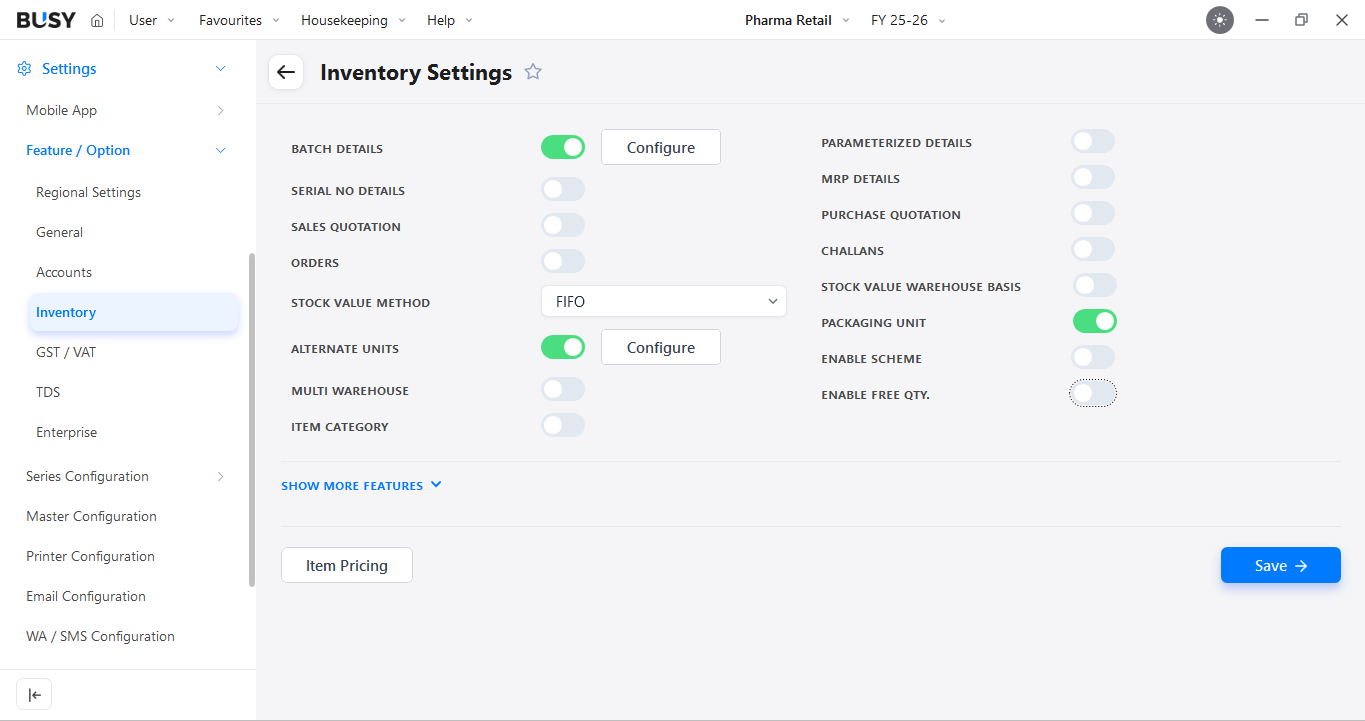
Alternate Units enabled in BUSY Inventory Settings

Go to Settings > Features / Options > Inventory and enable Alternate Units.

Step 2: Configure Alternate Unit Settings
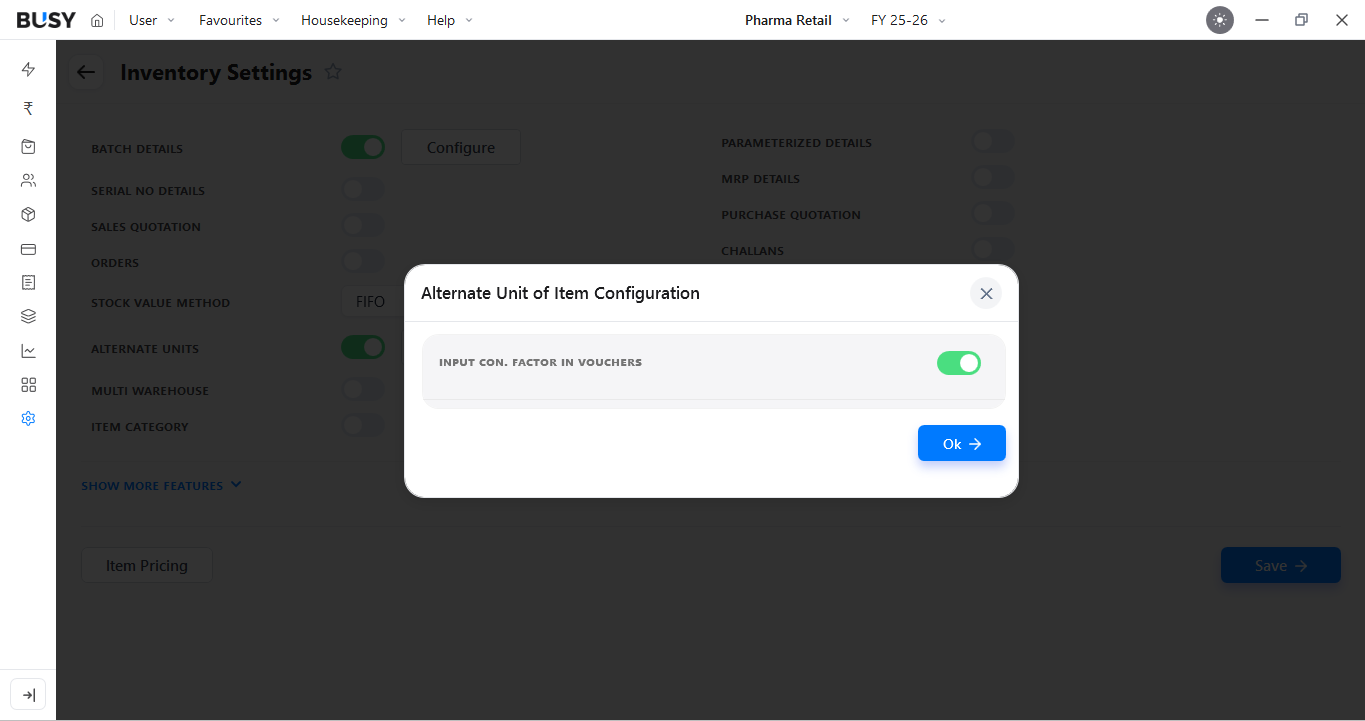
Alternate Unit of Item Configuration window in BUSY

In the configuration window, enable Input Con. Factor in Vouchers if you want to enter the conversion factor during voucher entry.

If you need more than one alternate unit, also enable Packaging Unit.

Step 3: Configure Units While Creating an Item
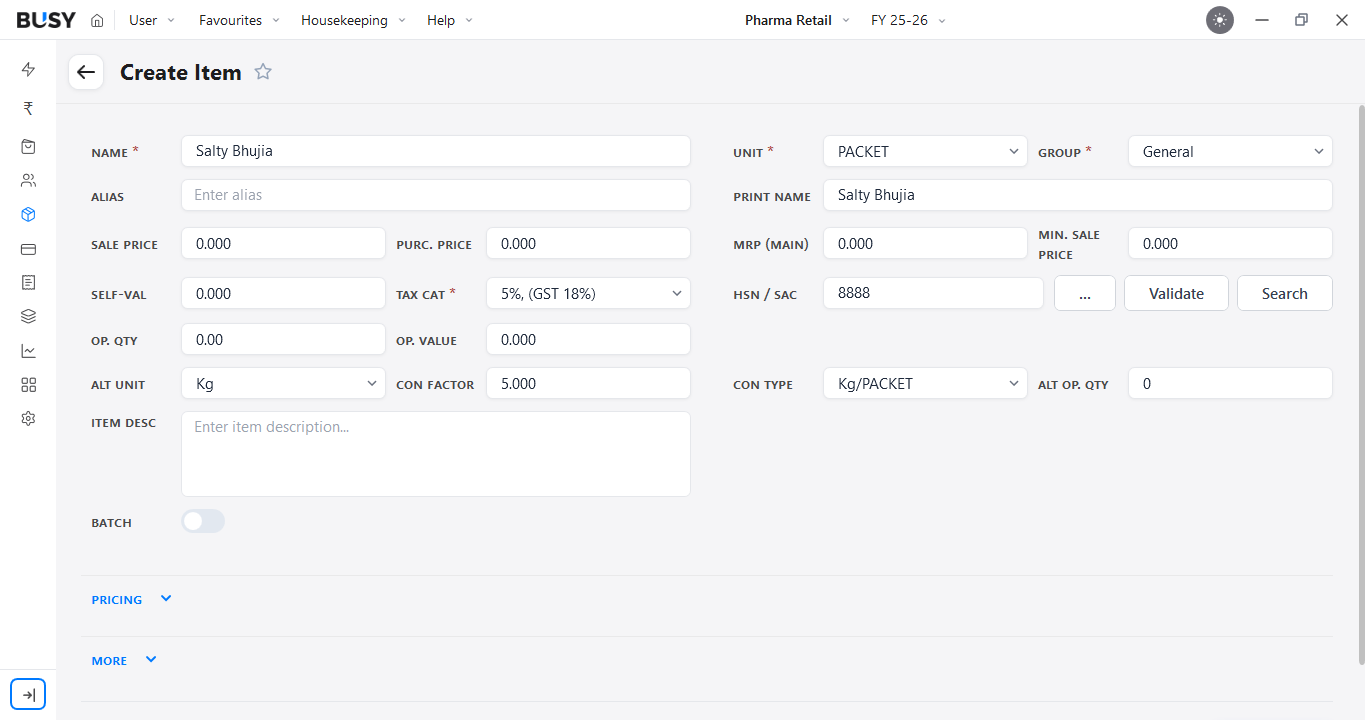
Main unit, alternate unit and conversion factor set in the item master

Create a new item and enter the required details. Select the main unit, then choose the Alt. Unit (Alternative Unit) and enter the Con. Factor (Conversion Factor).

Also select the required Con. Type (Conversion Type). If an opening quantity is available in the alternate unit, enter it in Alt. Op. Qty (Alternative Opening Quantity).

Step 4: Configure the Packaging Unit
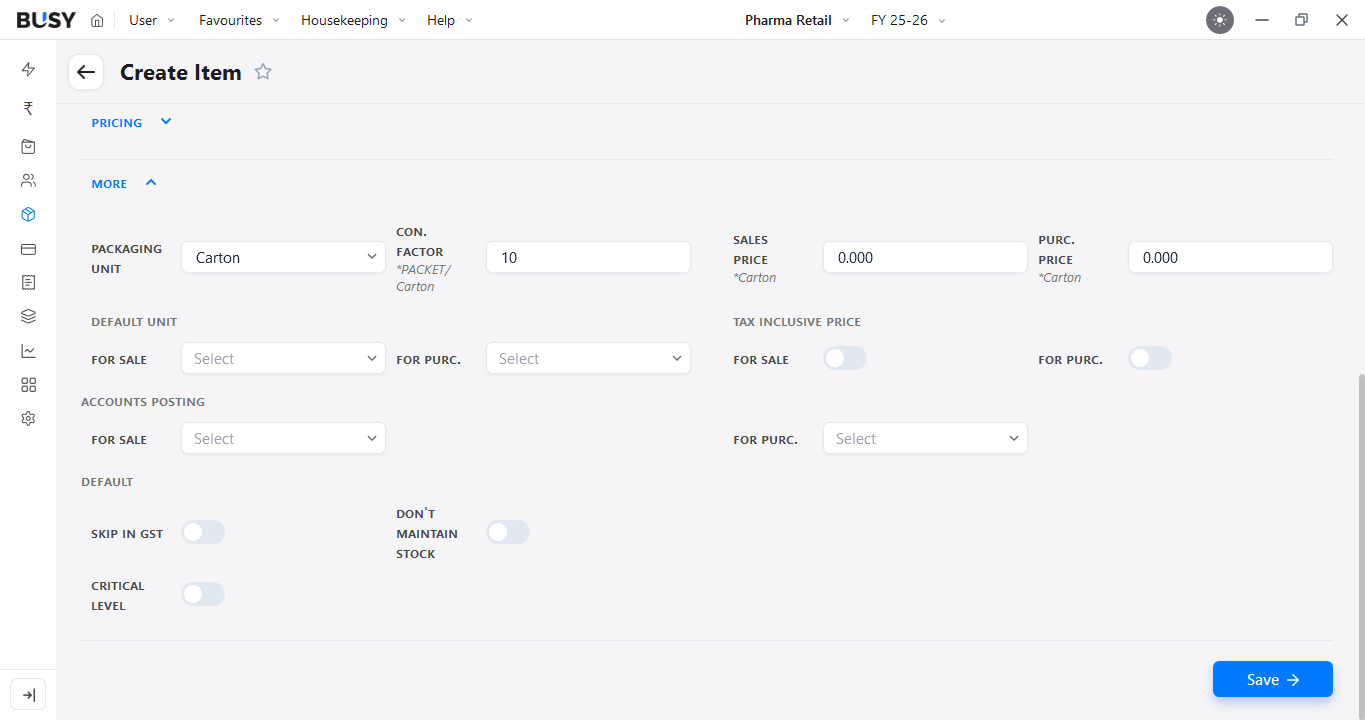
Packaging unit with conversion factor, sales price and purchase price in BUSY

Then click on More and select Packaging Unit. Enter the required Con. Factor, Sales Price, and Purchase Price for the packaging unit, then click Save.

The item will now be configured with up to three units: the main unit, alternate unit, and packaging unit.

Step 5: Use Multiple Units in a Purchase Voucher
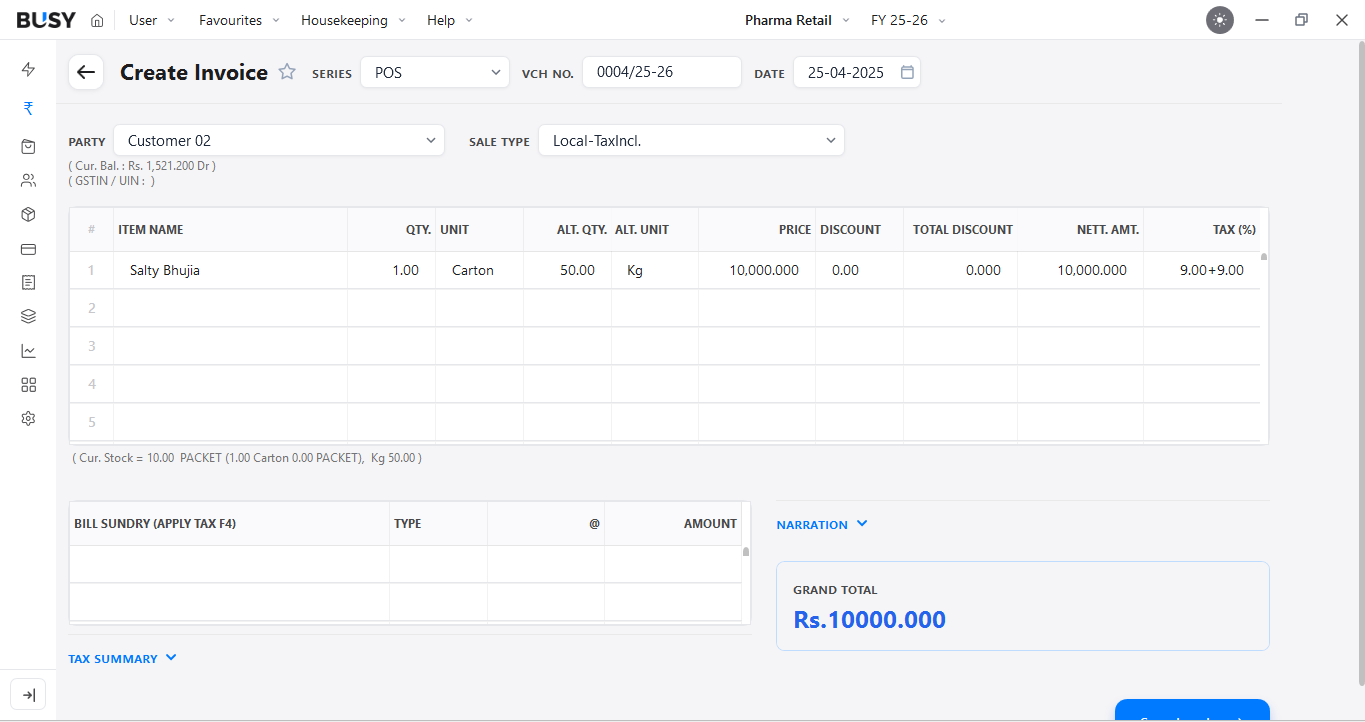
Voucher entry in the packaging unit with automatic quantity conversion

Create a Purchase Voucher, select the party and add the item. You can enter the quantity using the main unit or alternate unit.
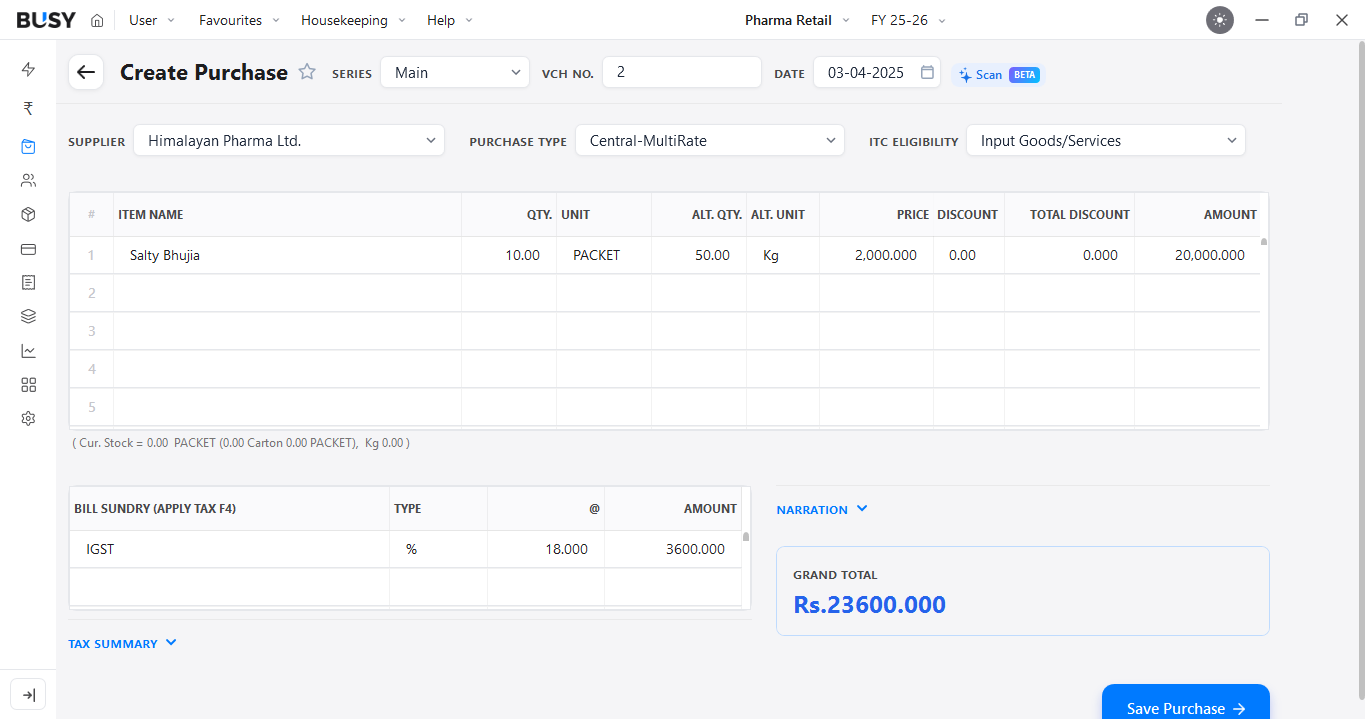
Purchase voucher recorded in PACKET with alternate quantity in Kg

If you want to purchase in the packaging unit, select PACKET in the Unit field.

BUSY will convert the quantity based on the configured conversion factor. Complete the remaining details and click Save.

Step 6: View Stock in Multiple Units
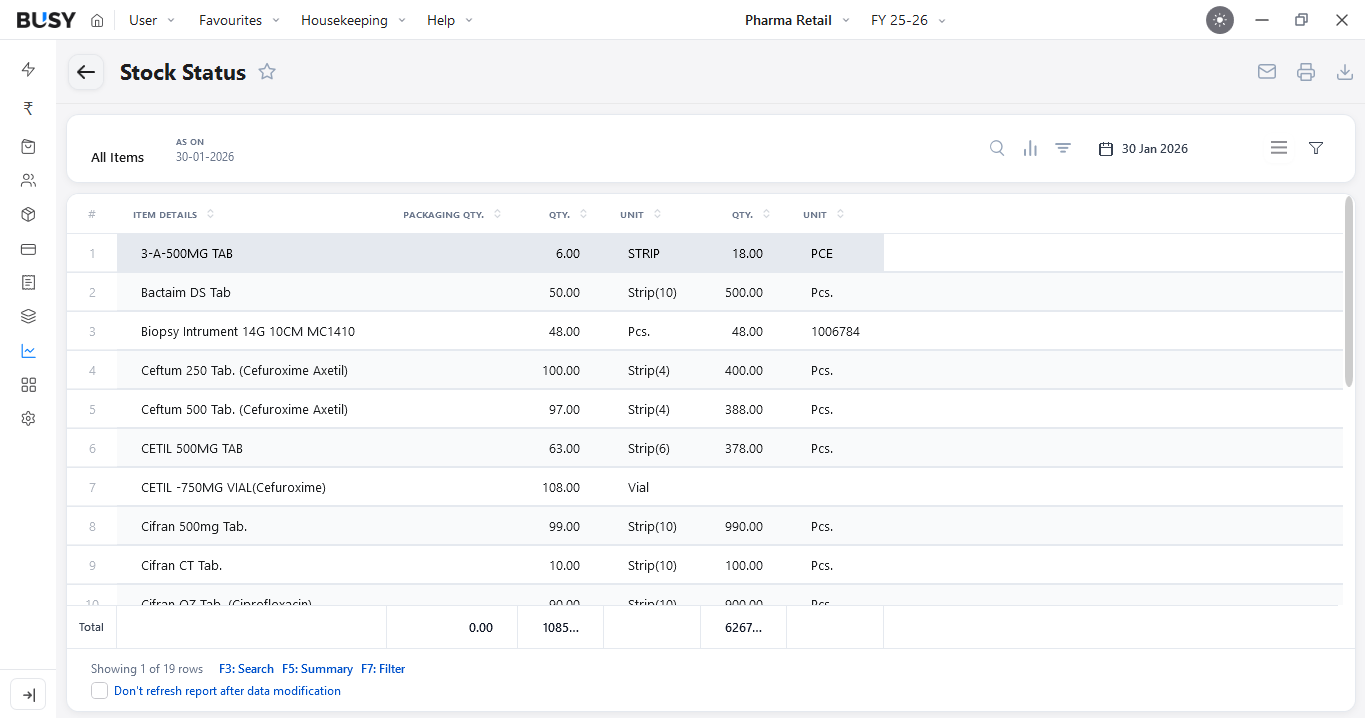
Stock Status report showing quantities in multiple units

Go to Reports > Stock Status to check the available stock for the item in the configured units.

What Our Customers Say

Real experiences from businesses across India.

"Smooth Accounting and Inventory Management for Daily Operations"

BUSY Software has made our accounting and inventory management much easier. The interface is simple to use, reports are detailed, and the software performs smoothly even with regular daily usage. It has been a valuable tool for our business operations.

Ismail A.

Support Manager

"Structured Financial Management with Accurate Reporting"

BUSY Accounting Software excels in handling Indian accounting and GST requirements with accuracy and depth. Its strong reporting, inventory control, and compliance-oriented design make it a dependable choice for structured financial management.

Rahul P.

Team Lead

"Everything You Need for Faster Billing and GST Management"

What I like best about BUSY Accounting Software is how simple it makes day-to-day accounting and billing without feeling complicated. It’s easy to use, fast, and has all the features needed for GST, inventory, and reports in one place. It saves a lot of time and keeps work smooth.

Nikhil G.

Sales Executive

"AI-Powered Features for the Next Generation of Accounting"

This is the simplest product in the industry, feature-rich and AI-enabled. The new BUSY Magic product is going to transform this industry.

Amit K.

Owner

"Reliable Accounting with Powerful Business Features"

Easy to use, powerful accounting and inventory features, strong GST compliance, and practical solutions for different business needs.

Pooja D.

Accountant

"Affordable Accounting Software with Reliable Support"

BUSY Accounting is very easy to use and provides very good software and support services compared to others.

Shubham

Supervisor

"Complete GST and Accounting Support for Growing Businesses"

BUSY is a strong choice for small and medium-sized businesses that need robust accounting, GST compliance, and inventory management at a competitive price.

Uday R.

Accountant

"A Reliable Solution for Managing Daily Accounting Tasks"

BUSY Accounting is very reliable to use, user-friendly, and helps solve problems efficiently. It manages my business requirements effectively.

Faizan S.

Accountant

"Reliable Accounting Software for Smooth Business Management"

BUSY Accounting is user-friendly, easy to use, reliable, and efficient accounting software that is perfect for managing business finances with ease.

Muahmmad

Accountant

"Beginner-Friendly Accounting Software for Businesses"

BUSY Accounting is very easy to operate, and even a beginner in accounting can start billing after 30 minutes of training.

Amit N.

Owner/Proprietor

Flexible Plans for Every Business

Paid plans start at just ₹5,000/year. Whatever your size, from small business to scaling enterprise, there's a BUSY plan built for you, so pick what you need today and upgrade anytime.

Explore All Plans & Pricing arrow_forward

Enjoy More Accounting Benefits With BUSY

smartphone

Free Mobile App for access on the go

history

Complete control over the User Activity Log

backup

Auto-Backup through Google Drive

See How BUSY Works in a Real Business Day

Introducing BUSY Magic

Frequently Asked Questions

Clear answers to common queries about this feature.

What is multiple unit inventory?

Multiple unit inventory allows the same item to be maintained in more than one unit, such as pieces, boxes and cartons, while keeping the quantities linked through a conversion factor.

Which businesses can benefit from multiple unit inventory?

It is useful for wholesalers, distributors, retailers and manufacturers that buy, store or sell the same product in different units or pack sizes.

What is the difference between a main unit and an alternate unit?

The main unit is the primary unit used for maintaining the item, while the alternate unit provides another way to record or view the same quantity based on a defined conversion factor.

What is a packaging unit?

A packaging unit provides an additional unit for items that are handled in larger or different pack sizes, such as cartons or cases, alongside the main and alternate units.

Can different units be used while recording purchases?

Yes. Depending on the item configuration, quantities can be entered using the main, alternate or packaging unit while recording a purchase voucher.

What is a conversion factor in multiple unit inventory?

A conversion factor defines the relationship between two units. For example, if one box contains 10 pieces, the conversion factor helps BUSY calculate the equivalent quantity automatically.

Can BUSY automatically convert quantities between units?

Yes. BUSY uses the configured conversion factor to calculate the equivalent quantity when a different unit is selected during voucher entry.

Can different units have different purchase or sale prices?

BUSY allows purchase and sale prices to be maintained for the packaging unit where required, helping businesses manage different pack sizes more accurately.

Can opening stock be maintained in an alternate unit?

Yes. If opening quantity is available in the alternate unit, it can be entered while configuring the item.

How does multiple unit inventory help reduce stock errors?

By linking different units through defined conversion factors, BUSY reduces the need for manual quantity calculations and helps keep stock quantities consistent across transactions.

Trusted by Industry Leaders

Ready to scale your business?

Join 6,00,000+ growing businesses who trust Busy for their financial management. Experience the power of professional accounting in the palm of your hand.

Start Free Trial
No Credit Card Required