Bank Reconciliation Software for Accurate Financial Records

The balance shown in your accounting records may not always match the balance in your bank statement. A cheque may already be recorded in the books but may still be awaiting clearance. The bank may deduct charges, credit interest, or process a direct payment that has not yet been entered into the accounts. These timing differences and missing entries can make it difficult to know whether the bank balance in the books is accurate.

Trusted by 6,00,000+ Businesses

Reconcile Faster. Maintain Accurate Books.

Reduce manual checking, identify differences quickly, and keep your bank records aligned with your accounts.

Save Reconciliation Time
Reduce Manual Errors
Improve Financial Accuracy
+91

* No credit card required

Trusted by Businesses, Rated by Experts

How BUSY Helps You Simplify Bank Reconciliation

upload_file

Import Bank Statements into BUSY

compare_arrows

Match Bank Transactions with Accounting Entries

fact_check

Review Unmatched & Cleared Transactions Easily

checklist

Track Cleared and Uncleared Bank Entries

How to Reconcile Bank Transactions in BUSY

Step 1: Enable Bank Reconciliation

Bank Reconciliation turned on in Accounts Settings in BUSY

Navigate to Settings > Features/Options > Accounts > Bank Reconciliation.

Step 2: Open Smart Bank Reconciliation
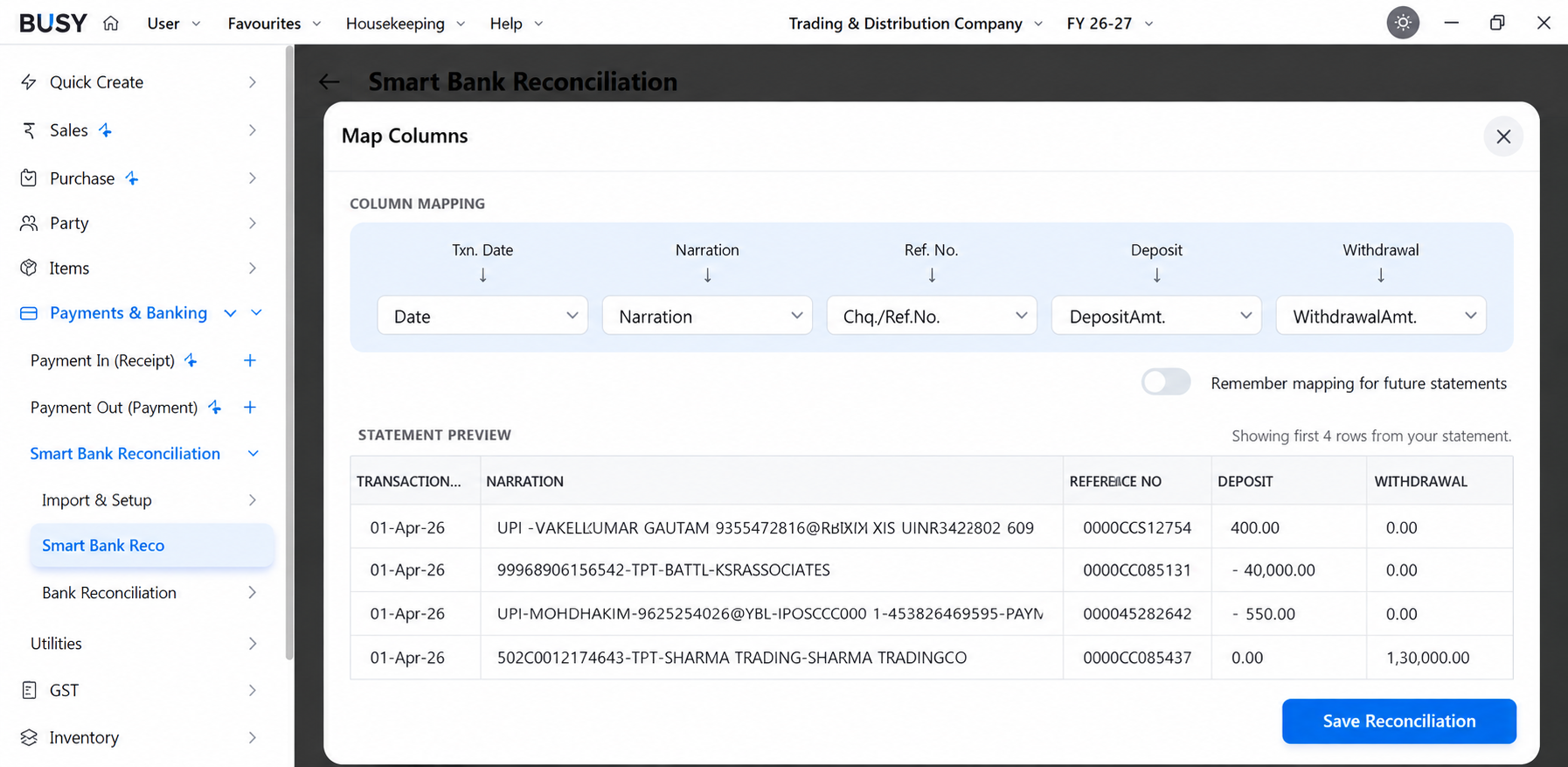
Smart Bank Reconciliation mapping interface in BUSY

Go to Payments & Banking > Smart Bank Reconciliation > Bank Reconciliation.

Step 3: Open the Bank Reconciliation Report

Bank Reconciliation - All Bank Entries for the selected bank account

Now, go to Bank Entries to view all the transactions for the selected bank account.

Step 4: Reconcile Bank Entries

Feed Clearing Date window against a selected bank entry

When an entry appears in the bank statement, select it and press F4.

Enter the actual date on which the transaction was cleared by the bank. The clearing date should be taken from the bank statement and should not be assumed from the voucher date.

Step 5: Check the Reconciliation Statement

Bank Reconciliation Statement showing ledger balance and uncleared cheques

Once it is done. Open the reconciliation statement and review the book balance, bank statement balance and outstanding entries.

What Our Customers Say

Real experiences from businesses across India.

"BUSY Made Daily Accounting and Inventory Management Easier"

BUSY has made accounting and inventory management easier for our business. The software is easy to access and helps us maintain accurate records while saving time on daily accounting tasks.

M Komal

Accountant, Accounting

"Faster Retail Billing with Better Stock Control"

I am very happy with BUSY Accounting Software. I recently bought it for my retail store, and it has solved many of the problems I was facing earlier. Barcode billing, scanning, reconciliation, and other daily tasks have become much easier. Overall, it is a good software for retail businesses.

Rohan Kumar

Founder, Retail

"Complete Control Over Billing, GST, and Inventory"

BUSY Accounting Software has made our billing, GST, and inventory management much easier. It is simple to use, delivers accurate reports, and helps us manage daily business operations efficiently.

Shree Ji Infotech

Assistant General Manager, Accounting

"BUSY Brought Accounting, Billing, and Reporting Together"

Excellent and good services. The software helps manage accounting, inventory, billing, GST, and reporting efficiently while keeping business operations organised and productive.

Compact Softwares and Services

Administrator, Accounting

"BUSY Made Business Management Simple and Organised"

BUSY Accounting Software has transformed the way we manage our business. Its user-friendly interface, powerful accounting features, and efficient inventory management make daily operations simple and organised. From billing and financial reporting to stock management and business insights, everything is available in one reliable platform.

Priyanka Rana

Founder, Dairy

"BUSY Simplified Accounting and Inventory Management"

BUSY Accounting Software is a reliable and user-friendly solution that brings accounting and inventory management together in one platform. It has streamlined our daily business operations and makes it easy to generate accurate financial reports whenever needed.

Ayesha Bashir

Digital Marketer, Cosmetics

"BUSY Helped Manage Complete Business Operations in One Place"

This is the best software for the MSME industry as it is very simple, user-friendly, cost-efficient, and a complete business management solution. It helps manage all business functions properly from a single platform.

Neha

Founder, Accounting

"Affordable GST Compliance with Essential Features"

BUSY is easy to use, offers all essential GST features, and comes with excellent customer support at an affordable price.

Shilpi Sinha

User, Computer & Network Security

"Accurate Reports for Better Financial Analysis"

BUSY is excellent for detailed financial analysis and compliance reporting.

Nandini

Accountant, Accounting

"A Reliable Solution for Everyday Business Operations"

BUSY has simplified our accounting and inventory management with reliable performance, powerful features, and an easy-to-use interface. It offers excellent value by helping us manage daily business operations more efficiently.

Muhammad Ahmed

Executive, Marketing and Advertising

"Driving Efficiency Across Accounting Operations"

I've been using BUSY Software for managing accounts and inventory, and the experience has been excellent. The software is user-friendly, reliable, and helps streamline daily business operations. The support team is also responsive and professional. Highly recommended for businesses looking for an efficient accounting solution.

Ismail Amin

Chief Executive Officer, Consumer Electronics

Flexible Plans for Every Business

Paid plans start at just ₹5,000/year. Whatever your size, from small business to scaling enterprise, there's a BUSY plan built for you, so pick what you need today and upgrade anytime.

Explore All Plans & Pricing arrow_forward

Enjoy More Accounting Benefits With BUSY

smartphone

Free Mobile App for access on the go

history

Complete control over the User Activity Log

backup

Auto-Backup through Google Drive

See How BUSY Works in a Real Business Day

Introducing BUSY Magic

Frequently Asked Questions

Clear answers to common queries about this feature.

Why is bank reconciliation important for a business?

Bank reconciliation helps confirm that transactions recorded in the books match the bank statement. It also helps identify missing entries, duplicate vouchers, uncleared cheques and bank charges before they affect reports or cash-flow decisions.

Why does the bank statement balance differ from the book balance?

The balances may differ because some transactions are recorded on different dates. Common reasons include uncleared cheques, pending deposits, bank charges, interest credits, direct payments and missing or incorrect accounting entries.

How often should bank accounts be reconciled?

The frequency depends on transaction volume. Businesses with frequent receipts and payments may reconcile daily or weekly, while businesses with fewer transactions may complete the process monthly to keep records accurate and updated.

What should I do when a bank transaction does not match the books?

Check the transaction amount, date, reference number, bank account and related voucher. The entry may be missing, duplicated or recorded incorrectly. Make corrections only after verifying the transaction with the bank statement.

Can I import a bank statement into BUSY?

Yes. BUSY supports bank statement import in compatible Excel or CSV formats. The imported transactions can then be compared with entries recorded in the selected bank ledger to support reconciliation.

Does BUSY support automatic bank reconciliation?

Yes. BUSY can compare imported bank transactions with accounting entries and match transactions that meet the required conditions. Entries that do not match remain available for review and correction.

Can bank transactions be reconciled manually in BUSY?

Yes. Users can open the uncleared entries for the selected bank account, compare them with the bank statement and enter the actual clearing date for each transaction manually.

Can cleared and uncleared transactions be viewed separately in BUSY?

Yes. BUSY allows users to review cleared and uncleared transactions separately. This helps identify entries still awaiting bank clearance and explains differences between the bank statement balance and the balance shown in the books.

Trusted by Industry Leaders

Ready to scale your business?

Join 6,00,000+ growing businesses who trust Busy for their financial management. Experience the power of professional accounting in the palm of your hand.

Start Free Trial
No Credit Card Required